

Comparison prepared by the VerificarEmails team. Because we are comparing our own service with a competitor, we explain how we ran the test and link each data point to its source so you can check it. Reviewed on 11 November 2026.
Short answer
VerificarEmails checks the format, the current operator (MNP) and whether the line is active (HLR) with a single provider, with packs in euros valid for one year and no subscription. You can verify single numbers or CSV, XLS, XLSX or TXT files from the dashboard, without coding, or via API. Its price list documents line status on 24 of the 32 Spanish networks. Data is processed on EU servers. With the same account you also verify emails, names and postal addresses, and you can use it from its remote MCP server, with nothing to install, or in pop-ups with verification.
Numverify only validates the number against the numbering plan. It has no portability (MNP) or network status (HLR) lookup, so it cannot tell you which operator a ported number is with today or whether the line is active. Also, its dashboard does not let you verify anything: everything goes through its API, one number at a time, and you pay with a subscription in dollars. Our test illustrates this: the VerificarEmails MNP lookup gave the current operator of a mobile ported from Vodafone to Digi, whose numbering still belongs to Vodafone, and marked a number from an unassigned range and a landline as rejected. With Numverify, that test requires calling its API, and we have not done it yet.
| Numverify | VerificarEmails | |
|---|---|---|
| Company | apilayer Data Products GmbH (Vienna), a subsidiary of Idera, Inc. (US) | Spanish company (Barcelona) |
| Support | None on the free plan; Platinum support is paid separately | By phone, chat and email |
| What it verifies | Phone only: format, line type and registered operator, based on the numbering plan | Phone (format, current operator with MNP and network status with HLR), email, name and postal address |
| Current operator and active line | No: it has no MNP or HLR | Yes: MNP and HLR, with line status on 24 of 32 Spanish networks |
| Validating the format of 1,000 / 10,000 numbers | $14.99 ≈ €13.37 / $59.99 ≈ €53.50 per month | €5 / €40 (packs) |
| Payment method | Monthly or annual subscription in dollars; the free plan is for non-commercial use only | Packs in euros valid for one year, no subscription |
| Verifying without coding | No: the dashboard only shows the key, the plan and usage; everything goes through the API, one number at a time | Yes: single numbers or CSV, XLS, XLSX or TXT files from the dashboard, as well as via API and MCP |
| MCP for AI assistants | No official server | Remote server with OAuth, nothing to install |
| Where data is hosted | US, Germany and Finland | Servers in the EU |
What this article compares
We compare the phone number verification of both services: what each lookup checks, which decisions it supports, how much it costs to validate 1,000, 10,000, 50,000 and 100,000 numbers, and how it is used via API, with files and from AI assistants (MCP). We focus on Spanish numbers.
We leave out the rest of APILayer’s APIs (APILayer is the company behind Numverify). APILayer also sells a “Number Verification API” on its marketplace with the same description and the same response, but it is contracted separately and under other terms: for example, when the quota runs out it stops responding instead of charging for the overage. Here we only cover numverify.com.
- VerificarEmails suits marketing or CRM teams that, before an SMS campaign, need to know which operator each number is with and whether the line is active. It also suits those who clean lists with files and prefer to pay in euros, with no subscription and with their data in the EU.
- Numverify suits development teams that only need to validate the format of numbers inside their application, with a similar volume every month.
Hands-on test: four Spanish numbers
We looked up four Spanish numbers in VerificarEmails, with the portability lookup (MNP) and the HLR lookup:
- a Movistar mobile;
- a mobile ported from Vodafone to Digi;
- a number from an unassigned range;
- a Barcelona landline.
We used the VerificarEmails MCP server, first number by number and then with a file. Numverify does not allow verification from its dashboard; the test requires calling its API. We have not done it yet, so its column is pending. What we say about Numverify in this section comes from its documentation.
| Number | VerificarEmails, MNP | VerificarEmails, HLR | Numverify |
|---|---|---|---|
| Movistar mobile | mobile; current operator: Movistar | connected; original and current network: Movistar | Pending API test |
| Mobile ported from Vodafone to Digi | mobile; current operator: DIGI mobil (214-22) | no-coverage; only returns the original network: Vodafone | Pending API test |
| Number from an unassigned range | unknown, rejected | inconclusive, rejected; type unknown | Pending API test |
| Barcelona landline | landline, rejected | inconclusive, rejected; type landline | Pending API test |
| Credits used | 1 per number, including rejected ones | 1.10 per number, including rejected ones and the “no coverage” one | Pending (according to its FAQ, every request counts) |
format.e164).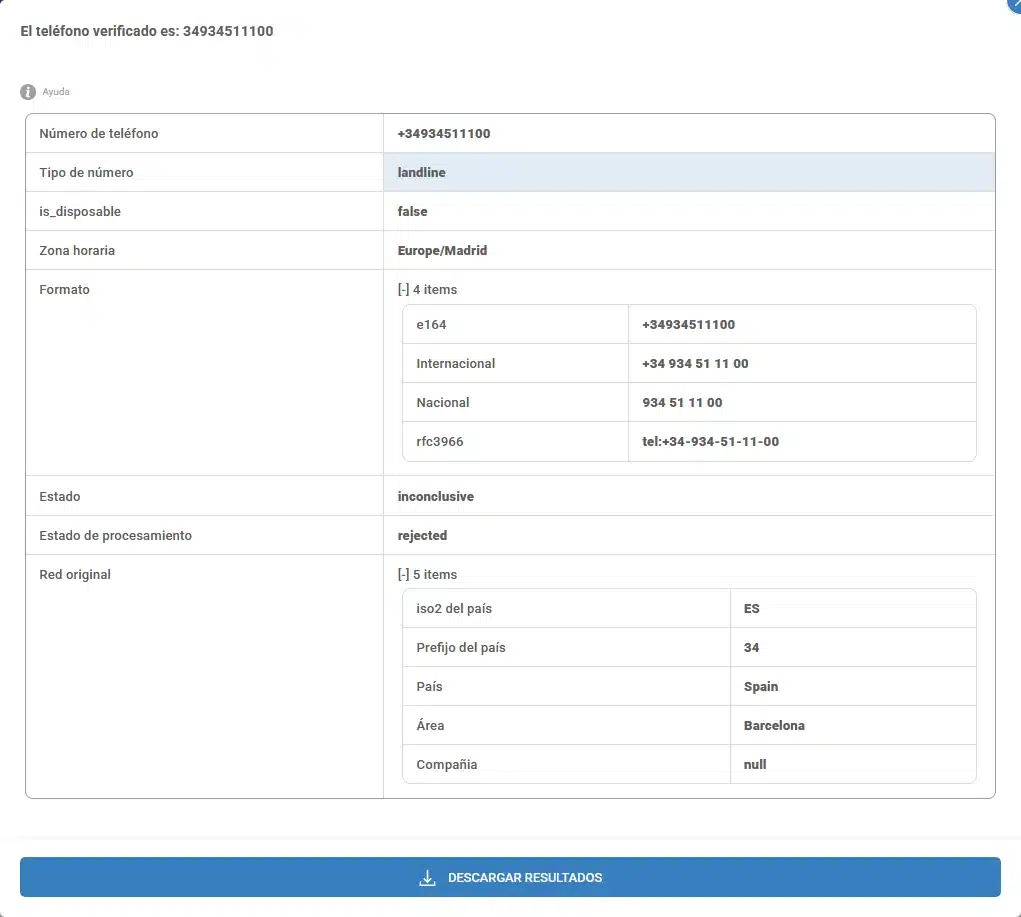
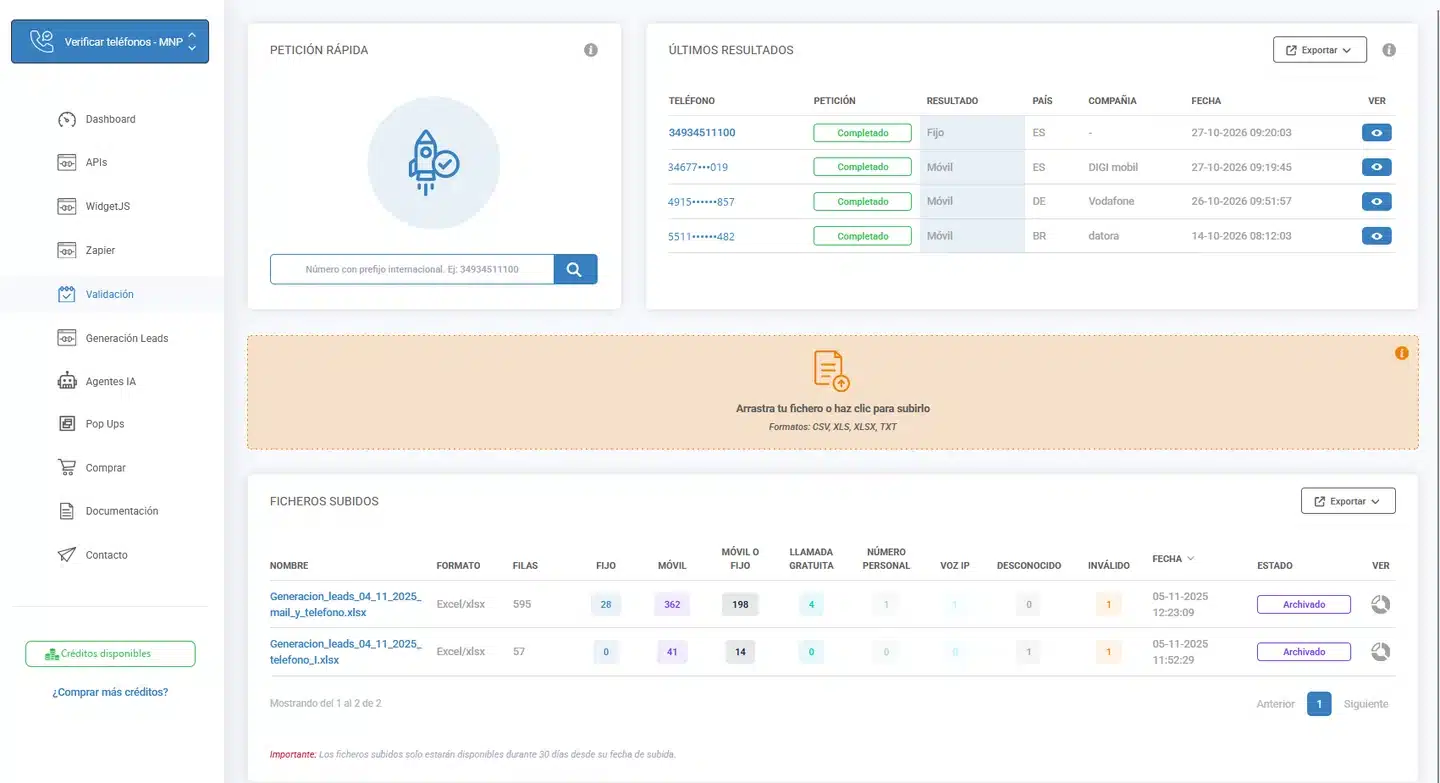
What it means. The ported mobile is the case that matters most before an SMS campaign. By its numbering it belongs to a Vodafone range, and that is what a numbering plan sees. The VerificarEmails MNP lookup showed that it is now with Digi. Numverify’s documentation says that carrier is the operator the number is “registered” with, without clarifying whether it is the original or the current one, and it does not include any portability field.
For that number, the HLR returned “no coverage” and only gave the original network, even though the VerificarEmails price list shows the Digi network with live status. That is why, in Spain, it is best to run the MNP lookup first and treat “no coverage” as “unverifiable”, not “invalid”. We explain it in why HLR verification fails.
The Movistar mobile is the simple case: MNP and HLR agree, and HLR confirms that the line is connected. A format validation would accept it, but it would not tell you whether it is active.
The number from an unassigned range is exactly the error that numbering plan validation is designed to catch. VerificarEmails catches it too: it rejected it in both MNP and HLR, so you don’t need a second provider to discard it. It was charged, like all lookups; at Numverify every request counts too, even if the number is not valid. Whether Numverify marks it as valid: false has yet to be checked.
The landline came back as landline and rejected in both lookups. With the line type from MNP you can separate landlines before an SMS campaign or before running HLR, which queries the mobile network and has no status to return for a landline. According to its documentation, Numverify also returns the line type (line_type).
File verification
In VerificarEmails we uploaded the four numbers in one file for MNP and in another for HLR. Each took 2 seconds, 4 and 4.40 credits were billed, and the results matched the individual lookups. When we ran several uploads in a row, the server returned a 429 error: there is a rate limit for files.
According to its documentation, Numverify has no file upload or batch endpoint: each request validates one number. Its dashboard does not allow file uploads either. To validate a list you have to code the calls or use its Zapier integration. Nor does it publish the rate limits for each plan.
What each lookup checks
There are three ways to check a phone number, and each one answers a different question. VerificarEmails offers all three with the same account; Numverify, only the first:
- Format or numbering plan: is the number possible, and what type is it? This is answered with the numbering tables, without querying the network. It is what Numverify does and what VerificarEmails syntactic verification does. It is useful, for example, to store the number in the E.164 international format.
- Portability (MNP): which operator is it with today? A portability database is queried. We explain it in MNP lookup.
- HLR: is the mobile connected to the network right now? The mobile network is queried. More details in HLR lookup.
This is how Numverify responds. Here is a complete response from its API for a US mobile:
{
   "valid": true,
   "local_format": "4158586273",
   "intl_format": "+14158586273",
   "country_code": "US",
   "country_name": "United States of America",
   "location": "Novato",
   "carrier": "AT&T Mobility LLC",
   "line_type": "mobile"
}
There are no other fields. Numverify validates and formats the number, and adds the country, the location, the line type and an operator that it does not identify as the original or the current one. It does not tell you whether the number has been ported or whether the line is active: in practice, it is a format check. The VerificarEmails portability lookup (MNP) and HLR answer exactly those two questions.
| Data | Numverify | VerificarEmails |
|---|---|---|
| Validity according to the numbering plan | Yes: valid | Yes: syntactic verification |
| E.164 format | international_format | format.e164 (also in MNP and HLR) |
| Line type | line_type, based on the numbering plan | Number type (12 documented types) |
| Operator | carrier: the “registered” one, without clarifying whether it is the original or the current one | Original network (syntactic and HLR) and current network (MNP and HLR) |
| Portability | No portability field | Current operator and is_ported |
| Network status | No | HLR: connected, absent, no-teleservice-provisioned or inconclusive |
| MCC/MNC and IMSI | No | MCC/MNC; IMSI depending on the operator (HLR) |
| Coverage | Claims 232 countries (the list on its home page shows 229 codes) | Format: worldwide. MNP: 237 countries. HLR with status: 171 countries; in Spain, 24 of 32 networks |
Which decision each lookup supports
| Decision | Is the numbering plan enough? | What you need |
|---|---|---|
| Discard mistyped or impossible numbers | Yes | Format (Numverify or syntactic) |
| Store the number in E.164 | Yes | Format (or the format.e164 from MNP and HLR) |
| Separate landlines and mobiles | Yes, by range | Format |
| Route an SMS by current operator | No: it sees the range’s operator | MNP |
| Know whether the mobile is connected before sending an SMS or calling | No | HLR |
In Spain, a number keeps its numbering when it changes operator. That is why the operator given by the numbering plan is the range’s operator, which may not be the current one, as happened with the ported mobile in our test. And a number being valid according to the plan does not mean someone is using it: to know whether a mobile is active you need HLR, as we explain in how to tell if a phone is active.
Pricing at equivalent volumes
VerificarEmails sells prepaid packs in euros for each lookup type: no subscription, valid for one year and with the same credits for single lookups and files. Numverify sells a monthly or annual subscription in dollars, with a number of requests per month. We compare the cost of validating exactly each volume with each provider’s cheapest option. Numverify’s direct equivalent is VerificarEmails syntactic verification.
| Numbers | Numverify, one month | VerificarEmails, syntactic |
|---|---|---|
| 1,000 | $14.99 ≈ €13.37 (Basic plan, up to 5,000) | €5 |
| 10,000 | $59.99 ≈ €53.50 (Professional, up to 50,000) | €40 |
| 50,000 | $59.99 ≈ €53.50 (Professional) | €120 |
| 100,000 | $129.99 ≈ €115.92 (Enterprise, up to 250,000) | €220 |
At 1,000 and 10,000 numbers, format validation costs less at VerificarEmails (€5 and €40), and you only pay for the pack you need, with no monthly fee. At 50,000 and 100,000 numbers, the Numverify subscription costs less. It is format validation only, it is paid every month in dollars and its free plan does not allow commercial use. MNP and HLR have no equivalent at Numverify; this is what they cost at VerificarEmails:
| Lookups | MNP (current operator) | HLR in Spain (line status) |
|---|---|---|
| 1,000 | €10 | €20 |
| 10,000 | €80 | €90 |
| 50,000 | €240 | €430 |
| 100,000 | €440 | €860 |
- Packs vs subscription: VerificarEmails packs are valid for one year and renewed if you top up the same service within that year. The Numverify subscription renews automatically and unused quota does not carry over to the next month. There is no pay-as-you-go option: to clean a list just once you have to sign up for at least a month.
- Files: at VerificarEmails, credits work the same for single lookups and files. In our test, a file of four numbers used 4 credits in MNP and 4.40 in HLR. At Numverify, each number is one API request.
- What is charged: VerificarEmails charges for each number whatever the result: 1 credit for syntactic and MNP and 1.10 for HLR, including rejected and “no coverage” ones. At Numverify, every request with a valid key counts, including those for invalid numbers and queries to its country list; it does not document whether errors count.
- Free: VerificarEmails gives you test credits when you create your account. Numverify gives 100 requests a month with no time limit, but only for non-commercial use and with no support.
- Numverify annual plan: $161.99 (≈ €144.45), $629.99 (≈ €561.79) and $1,325.99 (≈ €1,182.44) a year for 5,000, 50,000 and 250,000 requests a month, with a 12-month commitment. The monthly quota does not roll over either.
- Cancellation: Numverify’s service agreement requires written notice at least 30 days before the end of the period, while its FAQ only says that cancellation takes effect at the end of the period. There are no refunds, except in specific cases on annual plans.
- If you exceed your quota: Numverify’s overage page says the service keeps working and each extra request is charged at four times the unit cost of the quota ($0.011992 on the Basic plan). Its terms say the opposite: that the API returns an error until the next month. It is unclear which one applies.
- Platinum support: according to Numverify’s FAQ, when you choose a plan the Platinum support option is pre-selected, and it is paid separately. You can untick it.
- VAT: Numverify does not say whether its prices include it.
You’ll find all the packs on the VerificarEmails phone pricing page.
API, integrations and MCP
API and dashboard. Both offer a REST API to validate numbers in real time. Only VerificarEmails also lets you verify from the dashboard, without coding: single numbers or CSV, XLS, XLSX or TXT files. The Numverify dashboard shows the API key, the plan and usage, but it has no option to verify numbers or upload files: everything is done through its API, one number at a time.
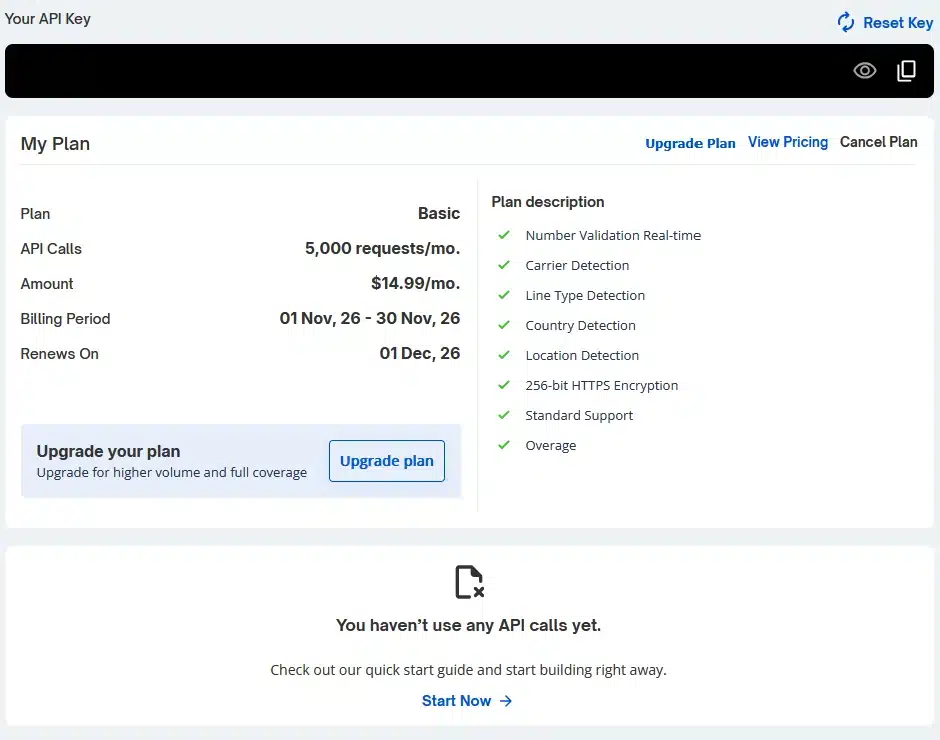
- VerificarEmails has an endpoint for each lookup (syntactic, MNP and HLR) and a file API for bulk uploads in CSV, XLS, XLSX or TXT; it recommends fewer than 250,000 numbers per file. Its API keys support a total and a per-minute limit that you set in the dashboard. You’ll find everything on the phone validation API page.
- Numverify works with a GET request to
apilayer.net/api/validatewith two parameters: the key (access_key, in the URL itself) and the number. If the number is in national format, you have to add the country (country_code). It publishes an OpenAPI specification and a Postman collection, and supports JSONP and CORS. Its documentation contradicts itself on whether the free plan supports HTTPS.
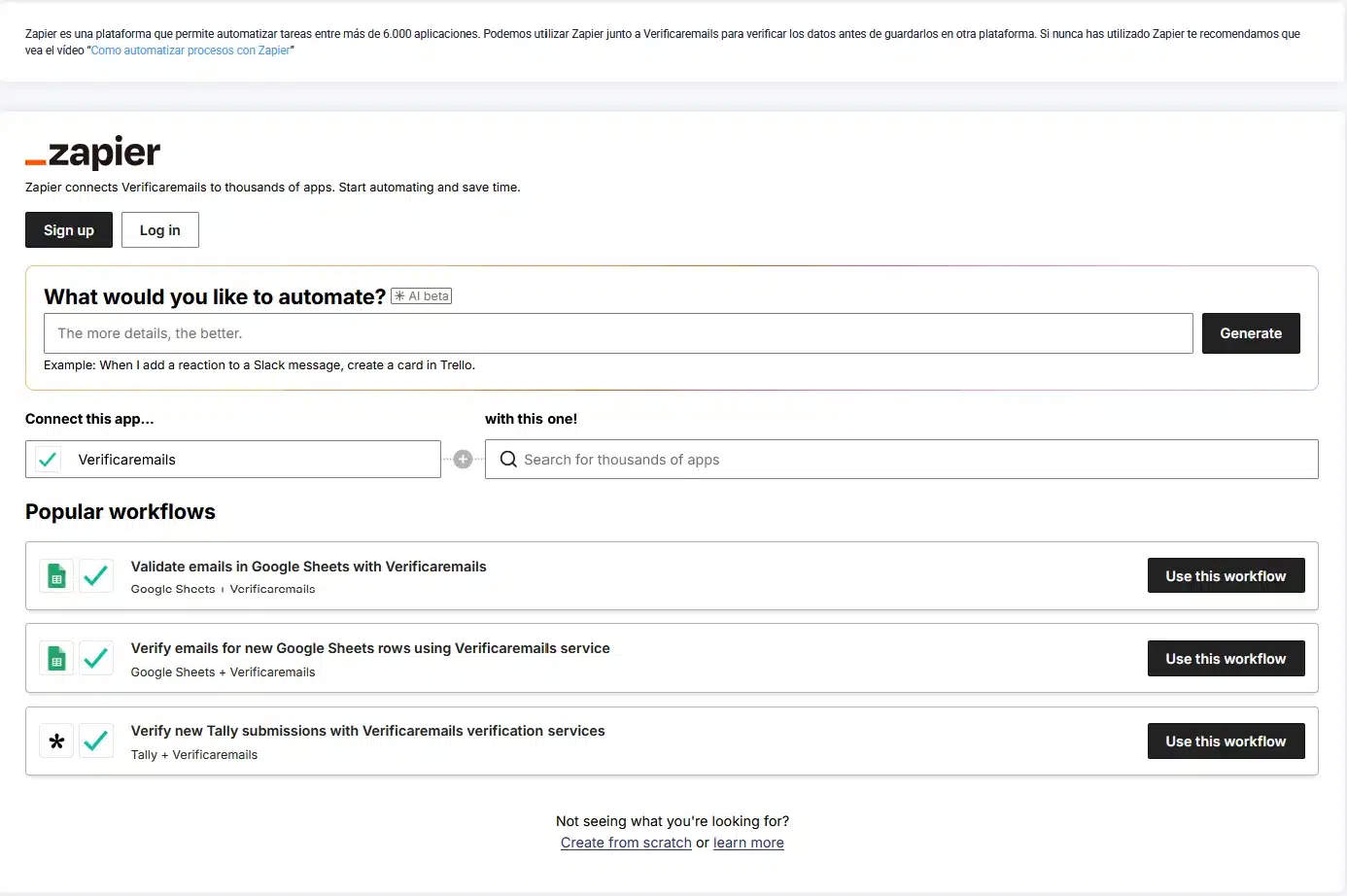
Integrations. For phone numbers, VerificarEmails documents integrations with Zapier, with its form widget and with Excel and Google Sheets. Its pop-ups with real-time verification can also check the phone number in each form with HLR or portability. Numverify connects with Zapier (one action, “Validate Phone Number”, which also appears in its dashboard) and publishes a tutorial for Google Forms. It has no n8n node.
MCP (AI assistants). Here the difference is clear:
- VerificarEmails offers a remote server that you connect to with your account (OAuth), with nothing to install. Its 14 tools include the three phone lookups (format, MNP and HLR), file upload, file status, download and balance.
- Numverify has no official MCP server. APILayer has one, but it only covers ipstack, another of its APIs. There is a community server that its own author describes as unofficial: it runs single lookups with your key, with no batches or files. We have not tested it.
In the test we used the VerificarEmails MCP: it looked up the four numbers with MNP and HLR, one by one and with a file, and downloaded the results.
Multi-data verification and the NewsletterSoft workflow
A sign-up form rarely asks only for a phone number. With the same VerificarEmails account you can run multi-data verification:
- the phone number, with the portability lookup to find its current operator and the HLR lookup to find out whether the mobile is active;
- the email;
- the first and last name;
- the postal address.
Each service has its own credits. Numverify only validates phone numbers, and only by their format.
This is the phone workflow in NewsletterSoft (in Spanish): the number is captured, normalized and verified according to the country, and then you decide whether it goes into the segment for an SMS campaign. For each step we indicate whether it is a native feature or requires the API, MCP or manual work:
| Step | What happens | How |
|---|---|---|
| 1. Capture | A NewsletterSoft pop-up or landing page collects the number in a phone field. | Native |
| 2. Normalize | The number is stored in E.164. It comes from the field’s format validation or from the format.e164 in the MNP or HLR response. | Native (field format) · API · MCP |
| 3. Verify by country | In Spain, MNP first (current operator) and then HLR (status). In Mexico, Colombia, Peru and the US, MNP only, because there is no HLR. A “no coverage” or rejected number counts as “unverifiable”, not “invalid”. | API /phonemnp/validate/single and /phone/validate/single · MCP validate_phone_mnp and validate_phone · Manual: file |
| 4. Store the result | The operator and the status are saved in a contact attribute or tag. | NewsletterSoft API or MCP (not native). Manual: import a CSV with the result. |
| 5. Segment | A segment filters by that attribute and by contactable = sms. | Native (segment editor) · API · MCP |
| 6. Send | The SMS campaign is sent to that segment. | Native |
With Numverify, step 3 stops at format validation. The segment could exclude impossible numbers or landlines, but it could not filter by current operator or by connected line.
Strengths of each
VerificarEmails
- It answers what the numbering plan cannot: the current operator of a ported number (MNP) and whether the mobile is connected (HLR). According to its price list, HLR returns status on 24 of the 32 Spanish networks.
- It brings format, MNP and HLR together with a single provider and a single account.
- It sells packs in euros, with no subscription, valid for one year. Validating the format of 1,000 and 10,000 numbers costs €5 and €40.
- You can verify from the dashboard without coding, number by number or with CSV, XLS, XLSX and TXT files, as well as via API and MCP. The Numverify dashboard does not allow verification.
- Its MCP is remote, with OAuth and nothing to install: it looks up single numbers, uploads files, tracks their status, downloads the results and shows the balance.
- Support by phone, chat and email.
- It processes data on EU servers and has a published data processing agreement. According to its list of sub-processors, Numverify hosts data in the US, Germany and Finland.
- It verifies email, name and address with the same account, and its pop-ups can check the phone number with HLR or portability.
Numverify
- It has a permanent free plan of 100 requests a month for testing or for non-commercial projects.
- Its API is simple: one request with the key and the number, with an OpenAPI specification and a Postman collection.
- It returns the number in E.164, the country and the line type and, when available, the location and the operator.
- It connects with Zapier.
Our recommendation
Choose VerificarEmails if:
- you need to know which operator each Spanish number is with today before sending SMS, even if it has been ported;
- you want to know whether the mobile is connected before an SMS campaign or a call;
- you prefer to have format, MNP and HLR with a single provider and a single account;
- you want to verify from the dashboard, number by number or with a file, without coding API calls;
- you want to pay in euros, with packs valid for one year and no subscription;
- you need your data processed in the EU;
- you also verify emails, names or addresses, or want to do it from an AI assistant (MCP) or in your pop-ups.
Numverify may be a fit if you only need to validate the format of numbers via API inside an application and you don’t need files.
Frequently asked questions
What is Numverify?
It is a REST API that validates phone numbers against international numbering plans. It returns whether the number is valid, its local and international (E.164) formats, the country, the line type and, when available, the location and the operator. It does not check portability or query the network. It is run by apilayer Data Products GmbH, based in Vienna (Austria) and a subsidiary of the US company Idera, Inc.
Is Numverify free?
It has a free plan of 100 requests a month, with no time limit, but only for non-commercial use and with no support. To use it in a business you need a paid plan: the cheapest, Basic, costs $14.99 a month (≈ €13.37) for 5,000 requests. VerificarEmails gives you test credits when you create your account, and its smallest format validation pack costs €5 for 1,000 numbers, with no subscription.
How much does Numverify cost?
The Basic plan costs $14.99 a month for 5,000 requests; Professional, $59.99 for 50,000; and Enterprise, $129.99 for 250,000. In euros that is about €13.37, €53.50 and €115.92 a month, excluding tax. Paying annually gives a 10% to 15% discount. It is always a subscription in dollars that renews automatically, and unused quota does not roll over. At VerificarEmails, by contrast, you buy packs in euros, with no subscription, valid for one year.
Does Numverify check whether a number is active?
No. Its valid field indicates that the number is valid according to the numbering plan, not that the line is in use. Numverify does not do HLR lookups. To know whether a mobile is connected you need an HLR lookup, like the VerificarEmails one, which according to its price list returns status on 24 of the 32 Spanish networks.
Does the operator Numverify returns take porting into account?
Its documentation does not make this clear. It says that carrier is the operator the number is “registered” with and does not include any portability field. In our test, a mobile with a Vodafone number was with Digi, and only the portability lookup (MNP) showed it.
How does the Numverify API work?
You sign up, get a key and make a GET request to apilayer.net/api/validate with the key (access_key) and the number. If the number has no international prefix, you have to specify the country (country_code). Each request validates a single number: there is no file upload or batch endpoint, its dashboard does not let you verify numbers and there is no official MCP server either.
Which Numverify alternative checks the current operator and whether the line is active?
VerificarEmails. With the same account you get format validation, the portability lookup (MNP) and the HLR lookup, for single numbers or files, with packs in euros, no subscription and data in the EU. If you want to compare other providers with network lookups, we also have comparisons of HLRLookup.com and Twilio Lookup with VerificarEmails.
Methodology, review date and sources
- Date: data and tests from 11 November 2026.
- Sample: four Spanish numbers: a Movistar mobile, a mobile ported from Vodafone to Digi, a number from an unassigned range and a Barcelona landline. In VerificarEmails, MNP and HLR lookups via MCP, one by one and with a file. Numverify does not allow verification from its dashboard and the test requires calling its API. We have not done it yet, so what we say about it comes from its documentation and from what its dashboard shows (reviewed with an account on 11 November 2026).
- Prices: each provider’s public pages on that day, without temporary promotions or tax. For Numverify we took the cheapest plan that covers each volume in one month. For dollars we used the ECB reference rate of 10 November 2026.
- Limits: four numbers do not measure any service’s accuracy, only how each lookup behaves. The sample does not include Orange, Yoigo, a switched-off line or numbers from outside Spain. We did not test VerificarEmails syntactic verification or the community MCP server for Numverify.
Numverify sources: pricing, FAQ, API documentation, OpenAPI reference, overages, terms, service agreement, integrations, sub-processors, data processing terms, marketplace Number Verification API and APILayer MCP.
VerificarEmails sources: phone pricing, phone API documentation, data processing agreement and MCP.
Looking for other options? See our comparison of the best phone number verification APIs.