

Comparison prepared by the VerificarEmails team. Because we are comparing our own service with a competitor, we explain how we ran the test and link each data point to its source so you can check it. Reviewed on 11 November 2026.
Short answer
VerificarEmails charges in euros, with no subscription or minimum term, with packs that are valid for a year and renew when you top up. If you buy credits for a one-off clean-up, it is cheaper at 50,000 and 100,000 emails: €195 and €345, compared with about €223 and €357 at NeverBounce. It is a Spanish company based in Barcelona, and data is processed on servers in the European Union.
With the same VerificarEmails account you verify email, phone (HLR and portability, also by file), name and postal address. It has a remote MCP for AI assistants, with nothing to install, and pop-ups with real-time verification. NeverBounce only verifies emails, has no official MCP and processes data in the US. It is a ZoomInfo brand: if you connect your CRM or your email marketing tool, its terms grant it a license over that contact data that includes passing it on to third parties, unless you opt out. In our test with three addresses, the two agreed on all three: Gmail valid, and the corporate and Yahoo mailboxes left unconfirmed by both.
| NeverBounce | VerificarEmails | |
|---|---|---|
| 100,000 emails | $400 ≈ €356.70 (pay-as-you-go) or $159 ≈ €141.79/month (Growth) | €345 (pack in euros, no subscription) |
| 10,000 emails | $50 ≈ €44.59 (pay-as-you-go) or $49 ≈ €43.70/month (Growth) | €65 (pack in euros, no subscription) |
| Credit expiry | 12 months from purchase | 1 year; renewed when you top up the same service |
| Website and documentation in Spanish | No: English only, dashboard included | Yes, dashboard included |
| Where data is processed | US | Servers in the EU |
| Other contact data | Email only | Email, phone, name and postal address |
| MCP for AI assistants | No official one (ZoomInfo’s doesn’t verify emails) | Remote server with OAuth, nothing to install |
| Catch-all and unknowns | Charged (no documented exceptions; confirmed in the test) | Charged (1 credit per record) |
| Company | ZoomInfo Technologies LLC, doing business as NeverBounce (Washington, US) | Spanish company (Barcelona) |
What this article compares
We compare the email address verification of the two services: one by one, by file, via API and from AI assistants (MCP). For each one we review what it checks, what it calls each result, what it charges, when credits expire and how much it costs to clean 1,000, 10,000, 50,000 and 100,000 addresses.
We also explain its relationship with ZoomInfo. NeverBounce is a brand of that company: its terms of use are signed by “ZoomInfo Technologies LLC d/b/a NeverBounce”, that is, ZoomInfo operating under the NeverBounce name, based in Vancouver, in the state of Washington (US).
Out of scope are the new features NeverBounce advertises on its pricing page, such as “AI scoring”, 200 new AI-selected contacts a month or the company name behind each email. Its documentation doesn’t explain their scope, and they are not email verification.
- VerificarEmails suits companies that want to pay in euros, with no subscription and with packs valid for a year, and that clean large lists on a one-off basis. It also suits those who want their data kept in the EU or who verify phone numbers, names or postal addresses as well as emails.
- NeverBounce may suit teams that want its Sync feature to clean the lists in their CRM or email marketing tool periodically.
Hands-on test: three real addresses
We verified three real addresses, all our own:
- a personal Gmail mailbox;
- a corporate mailbox on our own domain configured as catch-all, meaning it accepts any address;
- a personal Yahoo Spain mailbox.
In VerificarEmails we used the MCP server and then a CSV file upload with the same addresses. In NeverBounce we used the single verification in its dashboard. What the sample doesn’t cover, such as non-existent, disposable or role addresses, we describe based on each provider’s documentation.
| Address | VerificarEmails | NeverBounce |
|---|---|---|
| Personal Gmail mailbox | ok (valid) | “Valid” (“Safe to send”) |
| Corporate mailbox on a catch-all domain | ok_for_all (inconclusive) | “Accept All” (“Use caution”) |
| Personal Yahoo Spain mailbox | ok_for_all (inconclusive) | “Unknown” (“Use caution”) |
| Credits used | 3, one per address (the file used another 3) | 3, one per address, including the “Accept All” and the “Unknown” |
| Practical result | They agree on all three: Gmail valid; corporate and Yahoo unconfirmed by both | |
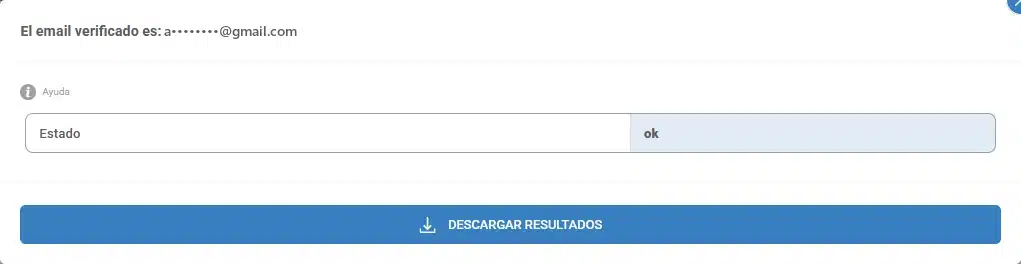
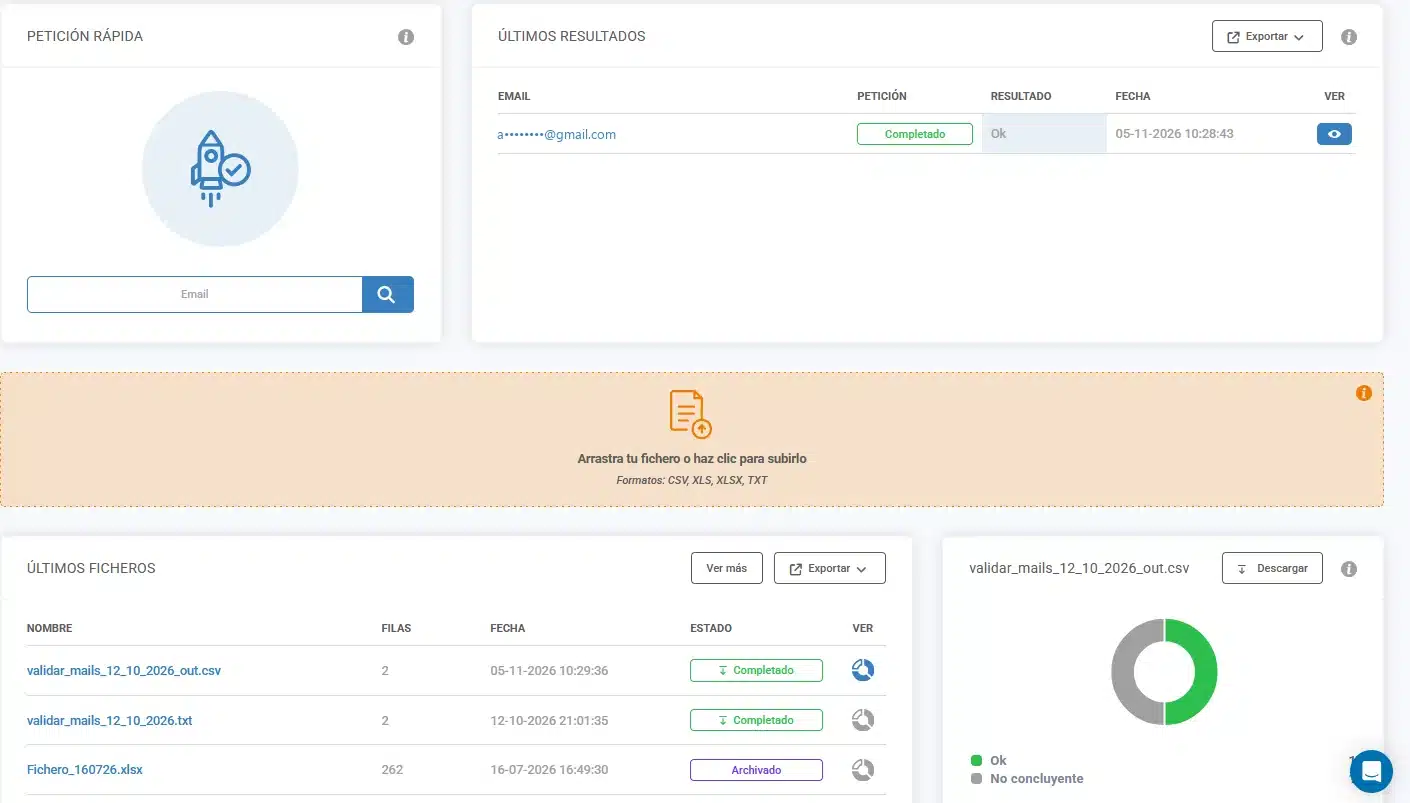
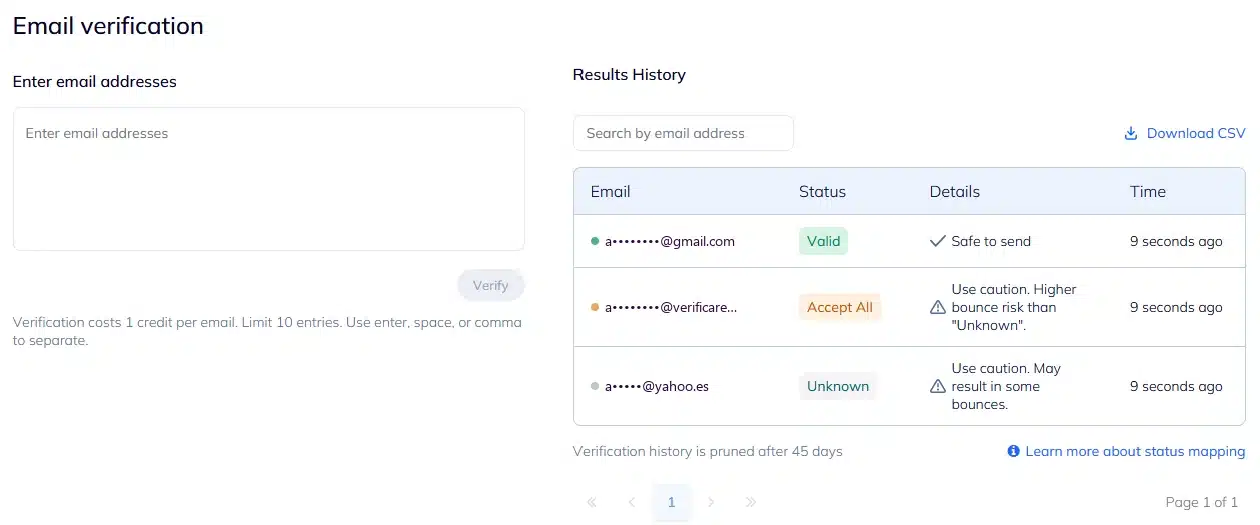
What it means. Both services agree on all three addresses. The Gmail one is valid in both. For the corporate and Yahoo ones, neither confirms the mailbox: NeverBounce flags them as “Accept All” and “Unknown”, with the warning “Use caution”, and VerificarEmails as “inconclusive”. Their servers don’t allow SMTP confirmation that the mailbox exists, and VerificarEmails says so clearly so you can decide what to do with those contacts.
Both charged for all three checks, one credit per address, including those left unconfirmed. With either service, it is best to treat these contacts as a separate group, as we explain in how to manage a catch-all email.
File verification
In VerificarEmails we uploaded the same three addresses in a CSV with a header row. The header was not charged, the process took 22 seconds and the results matched the single verification. It accepts CSV, XLS, XLSX and TXT files.
According to its documentation, NeverBounce accepts CSV in the dashboard and recommends converting spreadsheets to that format. Via API it accepts a CSV or a list from a URL, or the addresses inside the request itself (up to 25 MB). Before you pay, it analyzes the list for free and estimates its bounce rate. It removes addresses with incorrect syntax without charging for them.
NeverBounce contradicts itself on duplicates. Its pricing page says it removes them for free, but a 2025 help page says it doesn’t remove them automatically and verifies each occurrence separately. It doesn’t say whether each one is charged.
VerificarEmails deletes files 30 days after upload; NeverBounce, after 90.
Statuses: what each one calls each result
| Situation | NeverBounce | VerificarEmails |
|---|---|---|
| The mailbox exists | valid (code 0) | ok |
| The mailbox or domain doesn’t exist | invalid (code 1) | fail (in files: unknown_email, domain_error…) |
| Incorrect syntax | bad_syntax flag; removed in batches and not charged | incorrect (in files: syntax_error) |
| The server accepts any address | catchall (code 3), “Accept all (Unverifiable)” | ok_for_all / accept_all (inconclusive) |
| Couldn’t be checked | unknown (code 4), charged | unknown, charged |
| Disposable email | disposable (code 2) | disposable |
| Role account (info@, sales@) | role_account flag | Included in fail in the single-check API |
| Spam trap | Known ones come out as invalid; spamtrap_network and squatter_host flags | spam_traps |
| Typo in the domain | suggested_correction with the suggestion | Not documented |
| Free webmail | free_email_host flag | Not documented |
VerificarEmails gives 17 detailed statuses in file verification and also identifies complaint emails, something NeverBounce doesn’t document. Alongside the status, the NeverBounce API returns a list of flags (flags) out of 22 possible ones, which are not charged separately. They let you filter role, free webmail, disposable or known spam trap addresses.
Accept all (catch-all): what it means in NeverBounce
NeverBounce calls addresses on catch-all domains “Accept all (Unverifiable)”: code 3, or catchall in the API. Its help center explains that it is a domain-wide setting and that there is no definitive way to know whether the address is valid. In its code table it marks it as “Maybe” for sending.
It doesn’t document any additional verification to resolve them. It uses its “Hybrid” algorithm, which draws on responses from previous verifications to reduce accept-alls and unknowns, but it doesn’t publish how many it resolves this way. The API indicates it with historical_response and lets you turn it off. To send to these addresses, its help center recommends doing so in small batches and monitoring bounces.
It is the same case as the VerificarEmails ok_for_all or accept_all result: the domain accepts any address, so neither can confirm the mailbox. We saw it in the test: the corporate mailbox came out as “Accept All” in NeverBounce and “inconclusive” in VerificarEmails. VerificarEmails says so clearly so you can decide what to do with those contacts. Both charge one credit for each.
Unknown: what it means and whether it is charged
In NeverBounce, unknown (code 4) means it couldn’t check the address because the server isn’t responding. In the single-check API it is also the response when the wait time you set with the timeout parameter runs out.
It doesn’t document any billing exception. In batches it charges for every row with correct syntax, unknowns included. In the single-check API it says it deducts credits “per successful API call”, without clarifying whether an unknown counts. It only offers to re-run a list’s unknowns for free after a cancelled quality review. In our test, the dashboard also charged for the “Unknown” on the Yahoo address.
On this point the two agree: VerificarEmails also charges for unknowns, one credit per record. If you are comparing more services, see also our comparisons with ZeroBounce and Bouncer.
Pricing at equivalent volumes
We compare the cost of verifying exactly each volume with the cheapest option in each model. VerificarEmails sells prepaid packs in euros, with no subscription or minimum term. NeverBounce sells, in dollars, credit packages (pay-as-you-go) or the Growth monthly subscription. Its prices come from a copy of its pricing page from 29 October 2026 saved in the Wayback Machine, because its website was blocking our automated requests.
| Emails | VerificarEmails | NeverBounce, pay-as-you-go | NeverBounce Growth, monthly |
|---|---|---|---|
| 1,000 | €8 | $8 ≈ €7.13 | $49 ≈ €43.70/month (the lowest tier is 10,000) |
| 10,000 | €65 | $50 ≈ €44.59 | $49 ≈ €43.70/month |
| 50,000 | €195 | $250 ≈ €222.94 | $99 ≈ €88.28/month |
| 100,000 | €345 | $400 ≈ €356.70 | $159 ≈ €141.79/month |
How to read the table. With VerificarEmails you pay in euros, with no subscription or minimum term, and the pack is valid for a year, renewed if you top up the same service. If you buy credits for a one-off clean-up, it is cheaper at 50,000 and 100,000 emails: €195 and €345, compared with about €223 and €357 at NeverBounce. The same credits work for single checks, the API and CSV, XLS, XLSX or TXT files.
At 1,000 and 10,000 emails, NeverBounce’s pay-as-you-go is cheaper: $8 ≈ €7.13 and $50 ≈ €44.59, paid in dollars. Its Growth subscription is cheaper per month at 50,000 and 100,000 emails, about €88 and €142, but it is a monthly subscription in dollars and NeverBounce doesn’t publish whether it requires a minimum term. For a one-off clean-up, the real cost depends on that:
- Growth replaces Sync, its former subscription, which required a 3-month commitment on monthly billing. If Growth kept that requirement, cleaning 100,000 emails would cost 3 × $159 = $477 ≈ €425.36, more than the €345 at VerificarEmails. At 50,000, it would be 3 × $99 = $297 ≈ €264.85, compared with €195.
- If you can sign up for a single month and cancel, cleaning 100,000 emails costs $159 ≈ €141.79.
We could not confirm which of the two cases applies. Conditions worth knowing:
- Expiry: VerificarEmails packs last a year and renew if you top up the same service within that year. At NeverBounce, pay-as-you-go credits expire 12 months after purchase. Its terms are specific: each credit is valid for 365 days from purchase, and there are no refunds. In Growth, credits are replenished on each billing date, but its help center doesn’t say whether unused ones accumulate.
- What gets charged: VerificarEmails deducts one credit per record, whatever the result, and doesn’t charge for the file’s header row. Both charge for catch-alls and unknowns, as we confirmed in the test. NeverBounce doesn’t charge for incorrect syntax in batches, and in Growth it doesn’t charge for duplicates.
- Automatic tier upgrade in Growth: if you have the “Auto-upgrade” option turned on and run out of credits, NeverBounce moves you to the next tier and charges you immediately.
- Annual plan: the Growth help page mentions annual subscriptions, but the pricing page only shows the monthly one and doesn’t publish the annual price.
- Free credits: VerificarEmails gives test credits when you create your account. NeverBounce advertises that you can verify your first list without a card and offers “free test credits”, without saying how many.
All packs are listed on the VerificarEmails pricing page.
API, integrations and MCP
API. Both offer real-time and file verification, with a notification when the job finishes.
- NeverBounce has a REST API (version 4.2) with single verification, batch jobs with callbacks and balance checks. It publishes official SDKs for Node.js, Java, .NET and Python. It doesn’t publish its rate limits, and a 2024 help article warns that, without a saved payment method, the API is rate-limited and has no access to batches.
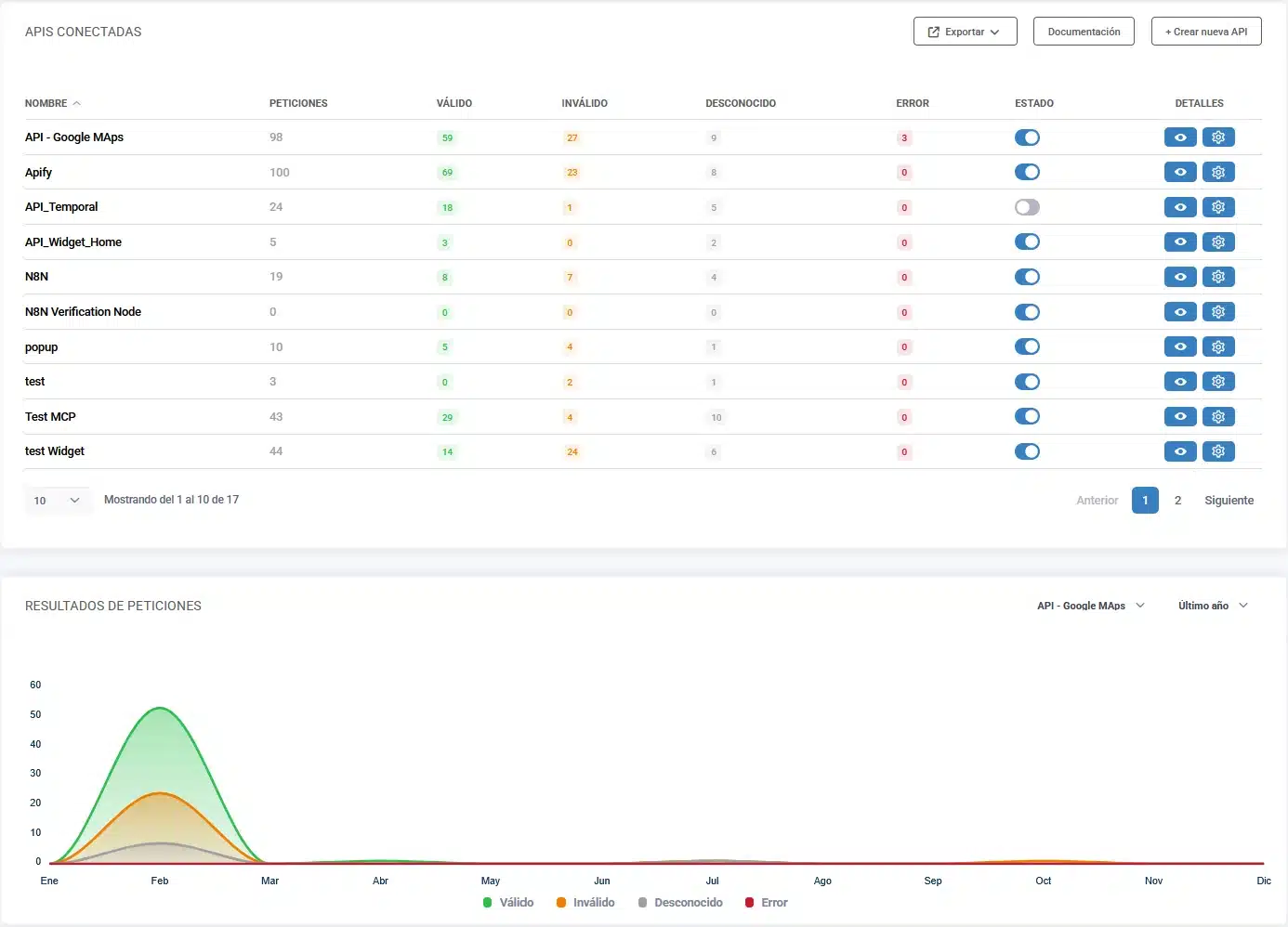
- VerificarEmails uses API keys that you can cap with a total and a per-minute limit from the dashboard. Its documentation includes examples in PHP, Python, Ruby, C# and Node. Everything is on the email validation API page, and for large lists there is also bulk verification via API.
Forms. Both have a JavaScript widget. NeverBounce’s blocks invalid and disposable addresses by default and lets valid, catchall and unknown ones through; it can also block free webmail and role accounts. VerificarEmails also has its pop-ups with real-time verification.
Integrations. The NeverBounce directory listed 83 in November 2025, about 70 of them through Zapier. From its dashboard it connects with ActiveCampaign, AWeber, HubSpot, Mailchimp, MailerLite, Mailjet, Marketo, Pardot and SendGrid, among others, and it has an official n8n node. Salesforce is only available via Zapier. Its Sync feature, included in Growth, verifies the lists in those tools daily, weekly or monthly and only charges for new, unique emails. VerificarEmails connects with Zapier, with n8n (its own node) and with Google Sheets and Excel.
MCP (AI assistants). Here the difference is clear:
- NeverBounce doesn’t have an official MCP server. We checked on 11 November 2026 on its GitHub, on npm, on PyPI, in the official MCP registry and in its documentation. ZoomInfo does have an official MCP, remote and with OAuth, but its tools are for searching and enriching company and contact data: none of them verifies emails, uploads files or checks the balance. There are third-party MCP servers that use your NeverBounce API key; we have not reviewed them.
- VerificarEmails offers a remote server that you connect to with your account (OAuth), with nothing to install. It exposes 14 tools: email, phone (HLR and portability), names, addresses, file upload, file status, download and balance.
In the test we used the VerificarEmails MCP: it verified the three addresses one by one and by file, and downloaded the result.
ZoomInfo and the data from the tools you connect
NeverBounce’s ownership by ZoomInfo has a practical consequence if you connect your CRM or your email marketing tool. Clause 3 of its terms of use (copy dated 14 October 2026) says that, when you connect those applications, NeverBounce extracts contact data from them (“Contact Data”).
Unless you opt out in the privacy settings, the terms grant it an irrevocable license over that data. Among other uses, the license includes the right to “sell, transfer, assign, sublicense, disclose, or make available the Contact Data or any portion thereof to any third party”. For that data, the terms incorporate their own controller-to-controller processing agreement (“S&I Controller-to-Controller DPA”).
The clause refers to the applications you connect, and Sync, the automatic clean-up included in Growth, works precisely that way. If you plan to connect your tools, for example to use Sync, check the opt-out option first and make sure your legal basis for processing that data allows such a transfer. The current terms don’t match what its help center said in 2024: “Your data is always yours and will never be shared”.
For the personal data you send it, NeverBounce applies a data processing agreement (DPA) with EU standard contractual clauses, incorporated into its terms. Its Annex I describes NeverBounce’s activity as processing “in connection with testing, developing, enhancing, and otherwise improving the Services”. Data is stored in the US. ZoomInfo claims SOC 2 Type II, ISO 27001 and ISO 27701 certifications, but it is not stated whether they cover NeverBounce.
Multi-data verification and the NewsletterSoft workflow
A lead capture form rarely asks for the email alone. With the same VerificarEmails account you can run multi-data verification:
- the email;
- the phone number, with an HLR lookup to find out whether the mobile is active or a portability lookup to find out its current operator (validate phone numbers);
- the first and last name;
- the postal address.
Each service has its own credits. NeverBounce focuses on email: its documentation doesn’t include phone, name or address verification.
This is the email workflow in NewsletterSoft (in Spanish): the contact is captured, verified, and then it is decided whether it joins the list and the welcome automation. For each step we say whether it is a native feature or requires the API, MCP or manual work:
| Step | What happens | How |
|---|---|---|
| 1. Capture | A NewsletterSoft pop-up or landing page collects the email, with the field set to be verified. | Native |
| 2. Verify | VerificarEmails checks the address and returns ok, inconclusive or fail. | Native in the pop-up · API /email/validate/single · MCP validate_email |
| 3. Decide the list | ok contacts go to the main list, inconclusive ones to a “review” list or tag, and fail ones are left out. | NewsletterSoft API or MCP (update the contact or add it to a list). Manual: import a filtered CSV. |
| 4. Welcome | An automation is triggered when the form is submitted or the contact joins the list. | Native (“form submitted” and “joined list” triggers) |
Strengths of each
VerificarEmails
- You pay in euros, with no subscription or minimum term. If you buy credits for a one-off clean-up, it is cheaper at 50,000 and 100,000 emails: €195 and €345, compared with about €223 and €357.
- Packs are valid for a year and renew if you top up the same service within that year.
- Support by phone, chat and email, and the website, documentation and dashboard are also available in Spanish.
- It is a Spanish company with servers in the EU and a published data processing agreement (more details in GDPR-compliant email verification). It deletes files after 30 days.
- It verifies email, phone, name and postal address with the same account.
- For phone numbers it runs HLR and portability (MNP) lookups, one by one or by file. Its price list documents line status on 24 of the 32 Spanish networks, including Movistar, Vodafone and Orange.
- It has an official MCP, remote and with OAuth, with nothing to install: 14 tools for email, phone, names, addresses, files and balance.
- It offers pop-ups with real-time verification, as well as a form widget.
- It accepts CSV, XLS, XLSX and TXT files, gives 17 detailed statuses per record and identifies complaint emails.
NeverBounce
- On pay-as-you-go, it is cheaper at 1,000 and 10,000 emails: $8 ≈ €7.13 and $50 ≈ €44.59.
- It analyzes the list for free before you pay and doesn’t charge for incorrect syntax in batches.
- It returns flags for role accounts, free webmail and known spam traps, and suggests typo corrections.
- It has native integrations with HubSpot, Mailchimp and ActiveCampaign, among others, the periodic Sync clean-up, an official n8n node and official SDKs for four languages.
- It offers a guarantee: it refunds the difference if the bounce rate exceeds 3%, subject to conditions (list cleaned within the previous 72 hours, at least 500 unique emails,
validresults only and no free webmail).
Our recommendation
Choose VerificarEmails if:
- you prefer to pay in euros, with no subscription or minimum term, with packs valid for a year that renew when you top up;
- you clean lists of 50,000 emails or more on a one-off basis: 50,000 cost €195, and 100,000, €345;
- you prefer to work with a Spanish company based in Barcelona, with the website, documentation and dashboard also available in Spanish;
- you need data processed on EU servers, with a published data processing agreement;
- you also verify phone numbers (HLR and portability), names or postal addresses with the same account;
- you want to verify from an AI assistant with a remote MCP, with nothing to install, or validate your forms with pop-ups.
NeverBounce may suit you if you want Sync to clean your CRM lists periodically, after reviewing the clause on data from integrations.
Frequently asked questions
What is NeverBounce and who owns it?
It is an email verification service owned by ZoomInfo. Its terms are signed by “ZoomInfo Technologies LLC d/b/a NeverBounce”, based in Vancouver (Washington, US). It verifies addresses one by one, by file, via API and with a form widget. Its website, documentation and dashboard are in English.
Is NeverBounce free?
It is a paid service, but you can start for free. Its pricing page advertises that you can verify your first list without a card and offers list analysis and “free test credits”, without saying how many. A 2024 help article mentioned 10 credits on sign-up and warned that, without a payment method, the API is limited. VerificarEmails also gives test credits when you create your account.
How much does NeverBounce cost?
On pay-as-you-go, $8 (≈ €7.13) for 1,000 credits, $50 (≈ €44.59) for 10,000, $250 (≈ €222.94) for 50,000 and $400 (≈ €356.70) for 100,000. Its Growth monthly subscription costs $49 a month (≈ €43.70) for up to 10,000 emails and $159 (≈ €141.79) for up to 100,000, and NeverBounce doesn’t publish whether it requires a minimum term. At VerificarEmails, 1,000, 10,000, 50,000 and 100,000 emails cost €8, €65, €195 and €345, in packs in euros, with no subscription and valid for a year. Prices exclude tax; NeverBounce’s come from the copy of its website dated 29 October 2026.
Do NeverBounce credits expire?
Yes. Pay-as-you-go credits expire 12 months after purchase: according to its terms, each credit is valid for 365 days and there are no refunds. In Growth, credits are replenished on each billing date, but its help center doesn’t say whether unused ones accumulate. At VerificarEmails, packs last a year and renew if you top up the same service within that year.
What does “unknown” mean in NeverBounce, and is it charged?
It means it couldn’t check the address because the server isn’t responding. In the API it also appears when the wait time you set runs out. NeverBounce doesn’t document any exception: in batches it charges for every address with correct syntax, unknowns included, and in our test the dashboard charged for the “Unknown” on a Yahoo mailbox. VerificarEmails also charges for unknowns.
What does “accept all” mean in NeverBounce?
It is its name for addresses on catch-all domains, which accept any address: “Accept all (Unverifiable)”, or catchall in the API. NeverBounce explains that there is no definitive way to know whether they are valid and marks them as “Maybe” for sending. It is the same case as the VerificarEmails “inconclusive” result: the domain accepts any address, so neither can confirm the mailbox. Both charge for it like any other verification.
Where does NeverBounce process data, and what does its DPA say?
In the US. Its privacy policy says that data is transferred to and stored on servers in that country, and its DPA allows it to be stored there or in any country where NeverBounce or its sub-processors have facilities. The DPA includes EU standard contractual clauses and is incorporated into the terms without a separate signature. NeverBounce deletes files after 90 days. VerificarEmails processes data on EU servers and deletes files after 30 days.
Methodology, review date and sources
- Date: data and test from 11 November 2026. NeverBounce’s prices come from a copy of its website dated 29 October 2026.
- Sample: three real addresses of our own (Gmail, a catch-all corporate domain and Yahoo Spain). In VerificarEmails, MCP and a CSV file. In NeverBounce, single verification from its dashboard; we did not test its file upload or its API. We did not test non-existent, disposable or role addresses: what we say about them comes from the documentation.
- NeverBounce website: on 11 November 2026, neverbounce.com responded to automated browsers with an anti-bot check. That is why we read its pricing, help and terms pages in Wayback Machine copies, and we give the date of each copy. The price tiers come from the code of the archived page itself. We read the API documentation, its GitHub, npm, the MCP registry and the DPA directly.
- Prices: without temporary promotions or taxes. For dollars we used the ECB reference rate of 10 November 2026.
- Limits: three addresses don’t measure the accuracy of any service. We did not check where the opt-out from data sharing is located in the NeverBounce dashboard.
NeverBounce sources: pricing (copy dated 29 October 2026), terms of use (copy dated 14 October 2026), result codes, accept all, Growth plan, guarantee, data retention, privacy policy, processing agreement, ZoomInfo sub-processors, integrations, API documentation, GitHub and ZoomInfo MCP tools.
VerificarEmails sources: pricing, documentation, data processing agreement and MCP.
Looking for other NeverBounce alternatives? See our comparison of the best email verification tools or our comparisons with ZeroBounce and Bouncer.