

















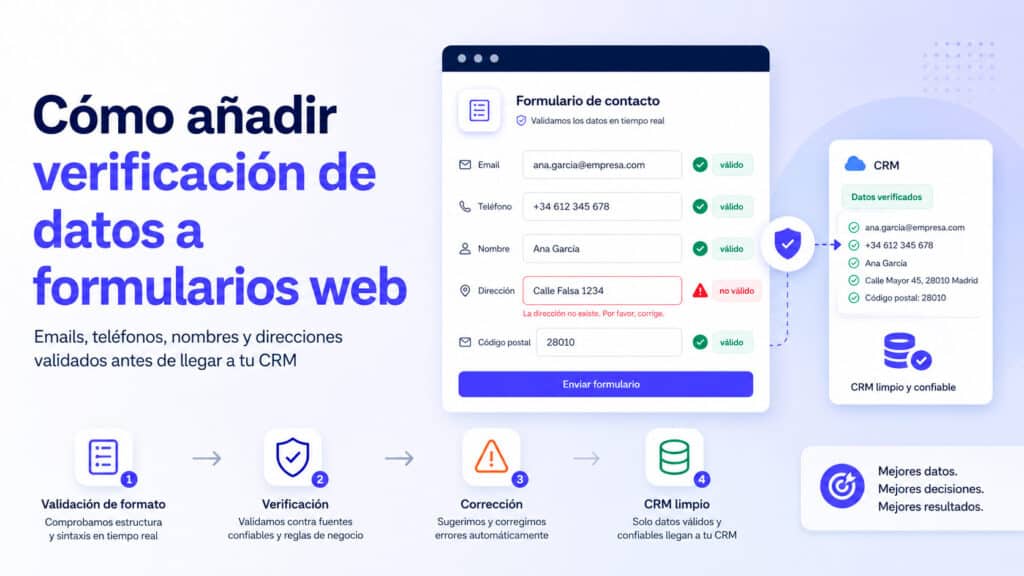
To add data verification to a web form, there are two paths: a widget that is configured without programming, or a validation API call from your server. In both cases, the data entered – email, telephone, name or address – is checked against reality before being accepted, and the form decides whether to block, warn or let pass depending on the result.
This technical guide explains how data verification in web forms works with the VerificarEmails services: what each service checks, how it integrates by widget and API, when to run the check, how to interpret the returned statuses and how to design the response of the form without punishing the user. The endpoints, signals, and behaviors described come from documentation and an actual implementation in production; where something has limits, it is said.
Validating the format is not verifying the data
The central distinction of this guide fits in one sentence: validate checks that the data seems correct; verify that the data exists; Confirm checks that its owner wants what the form proposes. These are three distinct controls that are often confused under the word “validation”.
| Control | Question that answers | Where it runs | Example |
|---|---|---|---|
| Validation (format) | Does this text have an email/phone structure? | In the browser, instantly | ana@gmial.com pass: your format is correct |
| Verification (Stock) | Does this mailbox/number/address really exist? | In an external service, via server | ana@gmial.com Fail: Domain Won’t Deliver Mail |
| Confirmation (will) | Does the owner of the data consent and want to continue? | After shipment (confirmation mail, double opt-in) | The user clicks on the link in the welcome email |
The three levels complement each other. Format validation is free and instantaneous, but it takes for granted any well-written data, even if it is invented. Verification looks at the real world—the mail server, the phone network, the street map—and detects what the format can’t see. The confirmation adds proof of consent, essential when the data will feed commercial communications.
What HTML and JavaScript Validation Can’t Do
Browsers include native validation: the type="email", required, pattern with regular expressions and the HTML standard constraint validation API, which allows you to mark fields as invalid and display messages with hardly any code written. It is the first line of defense and it is always convenient to use it.
But its scope ends in the syntax. A regular expression can’t verify that an email exists: it only confirms that the text fits a pattern. factura@empresa-que-cerro.com It’s flawless for any Regex and you’ll never get a message. The same goes for a well-formed but unsubscribed phone, or a mailing address in the perfect format of a street that doesn’t exist.
There’s a second, lesser-cited limitation: everything that happens in the browser can be bypassed. A hand-built submission against your server ignores the validation JavaScript entirely. That’s why the professional rule is twofold: validate on the client to help the user and repeat the checks on the server to protect yourself from those who don’t use your form in good faith.
Data verification in web forms fills exactly the gap that remains: reality checks, executed on the server, resulting at the time of submission.
What data can Verify Emails verify?
VerifyEmails offers four verification services that can be used from forms, each with its detail page and documentation:
- Email. Checks the actual deliverability of the mailbox: syntax, domain, mail server, and response for the specific account. According to the email validation service’s website, the check has more than 25 tests. It is the most used verification in forms, because the email is the default contact data.
- Telephone. Three levels: syntactic check (correct format and type of line, with international standardization), HLR query (asks the network if the mobile number is active and reachable) and portability query, which identifies the current operator. The detail is on the phone number validation page.
- Name and surname. It validates that the name entered is plausible and provides information such as gender, with international coverage; There is also name autocomplete. Documented on the name validation page.
- Postal address. Checks and normalizes addresses: The response indicates whether the address can be accepted and returns its standardized form, useful for physical shipments. See the postal address validation page.
The four services share the same usage model: you query a piece of data and receive a structured response with the verdict and details. And all four are available in the same ways: web portal for single queries, batch file to clean existing databases, API for integrations and widget for forms.
The widget: unscheduled verification
For those who don’t want to write code, VerifyEmails offers the creation of a form verification widget using a wizard, as stated on its validation services features page: the widget is generated from the account and validates the data at the time the user enters it, without programming knowledge.
The widget fits when the form is standard and the goal is simply to prevent incorrect data from being entered. When you need fine control – deciding field by field what is blocked and what is warned, personalizing messages, integrating the result into your lead flow – the API or a tool that already integrates it (such as the popup editor of VerificarEmails itself, which we talk about below) gives more leeway.
As a quick guide to choose via:
| Location | Recommended route |
|---|---|
| Standard form, no technical | Widget |
| Proprietary form with backend and flow | API with server-side intermediary |
| Recruitment with popups (new) | EmailVerify popup editor, verification included |
| Already captured database to be classified | Validation by file (batches) |
| Automation flows (n8n, Zapier, Make) | n8n native API or node |
The paths are not mutually exclusive: it is common to combine the widget or API in the input with a periodic batch cleanup on the accumulated.
API integration
The Validation API for Forms works by individual HTTP requests: one call per data, with a response in seconds. The basis is https://dashboard.verificaremails.com/myapi, authentication is done with the account token (auth-token) and the data travels in the parameter term. Each service has its own route:
| Fact | Endpoint | Validity signal in the response |
|---|---|---|
/email/validate/single |
result.status ok = (valid); ok_for_all indicates catch-all domain |
|
| Phone (syntactic) | /phonesyntactic/validate/single |
result.number_type + normalized number in result.format.e164 |
| Phone (HLR) | /phone/validate/single |
result.reachable connected = (active number in network) |
| Phone (portability) | /phonemnp/validate/single |
Line Type + Current Operator in current_network |
| Mailing address | /address/validate/single |
verdict with possibleNextAction = ACCEPT; returns the formatted address |
| Name | /name/validate/single |
result.status true= ; details (gender, country) in the result |
| Name Autocomplete | /namecomplete/validate/single |
term accepts JSON with partial name and country; returns suggestions |
The full parameter and response reference is in the API documentation and dashboard documentation. Two important implementation notes:
- The same account token is valid for all services, but each API checks that the token corresponds to the service invoked: mixing credentials from another product returns an explicit 403 error.
- Calls are individual and synchronous: they fit into a form submission. To clean a complete database there is validation by file, which is asynchronous and is queried by job ID; Don’t try to verify ten thousand records at the stroke of an individual call.
With this, adding verification to a web form is reduced to a pattern: your server receives the submission (or a previous request from the browser), calls the data endpoint, interprets the validity signal and responds to the form what to do. If you’re working with automations, the same pattern is packaged as a native validation node for n8n.
A real-world example of architecture: the EmailVerify popup editor
The most instructive way to look at these pieces together is a production deployment. VeriarEmails’ popup editor integrates all four services into its engagement forms, and its architecture is a good model for any form of your own:
- The field declares which check you want. Each field has attributes that indicate the service (email, syntactic phone, HLR, address, name) and the policy if it fails (warn or block).
- The browser does not call the API directly. The form sends the data to an endpoint of the server (
/api/verify/email, for example), and it is the server that adds the token and queries VerifyEmails. The token never travels to the browser. - The answer is normalized to a simple contract. Whatever the service, the form receives
{ ok, level, label, suggestion }, wherelevelIt is one of four states:valid,risky,invalidorunknown. All interface logic is written against that contract, not against the raw responses of each API. - The policy applies on shipping. With active locking, a negative result stops sending and paints the error message next to the field, with configurable style; With a warning, the data is marked. And if the verification cannot be executed (network down, quota sold out), the system is fail-open: the sending is accepted with an unknown state, because losing a lead due to a technical failure is worse than accepting an unclassified data.
- The result is saved with the log. Each lead retains the classification of its fields, which allows you to filter later what is exported or sent to the CRM.
If your use case is capture with popups, that integration is already done and does not require code; The full discussion of that approach is in the guide on validating data in forms and popups. This guide you read focuses on bringing the same architecture to your own forms.
Step-by-step: Add email verification to an existing form
The complete process for a form that is already in production, from the first step to the last:
- Create the account and get the token. The EmailVerify account token authenticates all API calls; Save it as your server secret (environment variable or secret manager), never in your browser code.
- Mount the intermediary endpoint. An endpoint on your backend (e.g.
POST /api/verificar-email) that receives{ email }, calls with the token and data, and responds to/email/validate/singlethe browser with a simple verdict. - Normalize the response. Translate the API response to your internal contract—valid, risky, invalid, unknown—on the server. So, if you add a phone number or address tomorrow, the form doesn’t change: only the translator.
- Connect the form submission. Before accepting the submission, the JavaScript of the form calls your endpoint and waits for the verdict, with a visible check indicator on the button.
- Apply the policy by state. Invalid → blocked with a correction message next to the field. Risky → accept or block depending on your case (decide it by type of form). Unknown → accepts and marks. Valid → future.
- Repeat the check on the server. The handler that processes the shipment revalidates the format and, if the data arrived without verification, executes the verification there: the only barrier impossible to overcome is that of the server.
- Saves the status with the log. A sort field next to the email allows you to filter afterwards what is synced with the CRM and what is reviewed.
- Try all three paths. A real email from you (valid), one with the domain misspelled (invalid) and the behavior with the service down or the quota sold out (unknown). The third path is the one that almost no one tries and the one that gives the most surprises.
With email working, extending the pattern to phone, name, or address is repeating steps 2, 3, and 5 with the endpoint and signals from each service.
Data Verification in Web Forms: When to Run It
There is no single right time to check; There are four, with different advantages and disadvantages:
| Timing | How it works | Advantage | Drawback |
|---|---|---|---|
| When leaving the field (blur) | The browser asks for verification when the user goes to the next field | The error appears soon, with the data fresh in the user’s | One call per field touched; it can verify data that the user was going to correct anyway |
| When submitting the form | Verification happens once, with the submission | Single call per definitive data; natural point of control | The user discovers the error at the end, when they thought they were done |
| On the server | Your backend checks before processing, regardless of browser | Impossible to circumvent; also protects entries that do not go through the form | No instant feedback to the user, unless you respond to the form |
| Before entering the CRM | The data is accepted and verified as a pre-synchronization | Zero friction in catchment; suitable for batches and historical | The bad data is already in; the user can no longer correct it |
The recommended combination for most forms: verification on send (one call, with the possibility of correction) plus repetition on the server as a safety net. Verification on leaving the field provides the best experience on long forms, at the cost of more calls. And the pre-CRM gate is the only option for records already captured, as well as a good second check even when there is verification in the submission: this ensures that valid data is sent to the CRM even if some input has skipped the form.
How to interpret returned statuses
Working with four normalized states simplifies all subsequent decisions:
- Valid. The data exists and works: the mailbox accepts mail, the mobile phone is connected to the network, the address is recognized and normalized. It is accepted without further ado.
- Risky. The data could work, but there is uncertainty. The typical case in email is the catch-all
ok_for_alldomain: the server accepts any address without confirming the specific mailbox, which is common in company domains. This is not a bad fact; it is a data without guarantee. - Invalid. The check was conclusive and negative: the mailbox does not exist, the number is not assigned, the address is not recognized. To accept it is to accept a dead fact.
- Unknown. The check could not be completed (waiting time, service not available, sold out). He says nothing about the data; says something about the moment.
Each service also provides specific signals that enrich the decision: in email, the distinction between confirmed mailbox and catch-all domain; on HLR phone, the connection status and current carrier; in the address, the standardised version ready to replace the one introduced; in name, the esteemed genre and country, useful for customization. The four-state contract decides the flow; specific signals feed the CRM.
Two rules of thumb. First, treat each state according to what it affirms, not according to what you fear; blocking the “risky” in a B2B form is equivalent to rejecting half a Spanish company with a catch-all domain. Second: always record the status next to the data; A field email_verification: risky in your database is worth a thousand subsequent cleanups, because it allows you to segment shipments by trust.
Block, warn, correct, or accept
With the status in hand, the form has four possible answers, and the choice depends on the cost of each error in your process:
- Block. The shipment is not accepted until the data changes. Suitable for email in incentive forms (coupons, downloads) and for any data on which the delivery of the service depends. The message should invite you to correct, not give up: “That mailbox doesn’t seem to exist, check the email” works better than “Invalid email”.
- Warning. The shipment is accepted with a visible notice and the data is marked. Suitable for “risky” states and for forms where friction costs more than dubious data (waiting lists, surveys).
- Correct. When the service returns a suggestion—a normalized address, an autocomplete name, a number in international format—it offers it: “Did you mean…?” turns a rejection into a one-click correction.
- Accept and classify. For “unknown” statuses, the healthy option is to accept and leave the data pending further verification. Punishing the user for a network failure of the service is the worst possible exchange.
A well-tuned per-field policy is usually: email in block with configurable accepted levels; phone on warning (or blocking only if the process depends on calling); Name and address in correction/warning. Uniform rigidity is the enemy of conversion.
Common deployment errors
These bugs appear regularly in verification integrations, and they’re all avoidable:
- Token in the browser. The most serious one, discussed in the following section: the credential visible in the code of the page is a gifted account.
- Blocking the “risky” without thinking about it. In B2B, catch-all domains are the majority in some industries. Blocking them rejects real customers; The decision should be made by form type, not by default.
- Accidental fail-closed. No one decided what happens if the service doesn’t respond, so the
awaiterror-unhandled crashes the form. The behavior in the event of failure must be an explicit code branch. - Check on each press. It multiplies calls by ten and punishes the user while typing. The right moments are leaving the field and sending it out.
- Discard the state. It is verified, decided and the result is thrown away. Without the saved classification, you can’t filter the sync with the CRM or audit the quality of the engagement over time.
- Check the history call by call. Ten thousand old records are not cleaned with the individual API: that’s what asynchronous, batch-based file validation is for, including list validation from Excel.
- Forget the second barrier. All verification in the browser, nothing on the server – any direct sending against the backend goes unchecked. Server checking is not optional.
Security: Credentials never in the browser
The most serious implementation error in form verification is calling the API directly from JavaScript on the page. Doing so exposes the account token to anyone who opens the developer tools, and an exposed token means that a third party can exhaust your quota or use your account.
The correct pattern is an intermediary on your server: the browser calls an endpoint of yours, your server adds the token, queries Verify Emails, and returns only the verdict to the browser. In addition to protecting the credential, the broker allows you to add your own defenses—IP request limits, origin checking—so that no one uses your form as a free verifier. It’s exactly the architecture of the real example described above, and the reason why there the token is a server secret and the browser only knows { ok, level }.
User Experience and Performance
Verification adds an external query to the shipping path, and that forces you to take care of three things:
- Times. The EmailVerify services page puts the validation of a record in 1-2 seconds on average. It is acceptable in a shipment, but it deserves a visual indicator: a state of “checking…” on the button avoid double clicking and the feeling of a hung form.
- Do not interrupt while typing. Checking on every keystroke is expensive and irritating. The right moments are leaving the field or sending out; never the typing.
- Elegant degradation. Decide in advance what happens if the service doesn’t respond: the fail-open option protects the conversion; Fail-closed protects the purity of the list. For lead capture, fail-open is almost always the right thing to do; For a registration where email is the key to the service, the opposite can be justified.
And a cross-rule of accessibility: the state of the field cannot communicate with color alone. Accompany the red border with text and icon, as recommended by the WCAG guideline on the use of color.
Finally, keep what the user typed when the verification fails: the error message must coexist with the data entered, not replace it with an empty field. Correcting two letters is a gesture; Rewriting the entire email on your mobile phone is a likely abandonment. This detail, along with a message explaining what to review, makes the difference between a check that recovers leads and one that scares them away.
Use cases
Contact form. Email verification when sending, in warning: the goal is to be able to respond, and a “that email seems incorrect” notice recovers typos without scaring anyone away. The saved state allows you to prioritize responses to verified contacts.
User registration. Email in lockout: If the account is activated by email, a dead mailbox is a lost user in the first step. Preflight also avoids sending activation emails that bounce.
SaaS with free trial. Email in block and, if the commercial process calls by phone, syntactic verification of the number in warning with correction to the international format. Sending only records with valid email to the CRM keeps the pipeline clean.
B2B demo request form. Email in lockdown but accepting the “risky” level (catch-all corporate domains abound), phone with HLR if the sales team relies on calling, and name with autocomplete for clean chips in the CRM.
Newsletter from a media outlet or blog. Email when sending, blocked with friendly message: the phantom subscriber degrades open rates from the first issue and contaminates the editorial decisions that are based on them. The saved state also allows you to purge the list before migrating it to another platform.
Checkout or registration in ecommerce. Corrected mailing address: The normalized suggestion avoids returned packages. For store marketing capture, the popup scenario is developed in the guide to integrating email validation popups into Shopify.
Privacy, Consent, and Double Opt-In
Verifying a piece of data is processing it: consulting an external service is part of the processing and must be covered by your privacy information, with its purpose (to guarantee the quality and usability of the contact data) declared. As always in the context of the GDPR, the tool does not exempt from obligations: informing, obtaining consent where appropriate and attending to the rights of the data subject continue to be the task of the controller; when in doubt, the reference in Spain is the AEPD.
And the conceptual frontier that closes this guide: technical verification is not a substitute for user confirmation. A verified email is a working mailbox, not a consenting person. If the form feeds into commercial communications, explicit consent—and double opt-in when your strategy requires it—are still a must. Verification makes double opt-in more efficient (no confirmations are sent to dead mailboxes), but it does not replace it. Similarly, verify doesn’t identify: knowing that a mailbox exists doesn’t tell you who wrote it, and that distinction matters when the form is the gateway to converting visitors into identified contacts.
Conclusion
Fact-checking on web forms bridges the gap between “looks right” and “really works.” Browser format validation is still necessary, but only the query against reality – the mailbox, the mobile network, the street map – prevents typos, invented data and dead records from entering your systems. The implementation has three decisions: the path (no-code widget or API with full control), the timing (when sending more of a security network on the server, as a general rule) and the policy by state (blocking the non-existent, flagging the doubtful, suggesting corrections and not punishing service failures).
All of the services described—email, phone, name, and address—are available with a single VerificarEmails account, with API documentation as a technical reference and the widget as a no-program alternative. Starting with the email field of your most important form is almost always the best effort to result improvement.
Frequently Asked Questions
How to add verification to a web form?
There are two ways. Unscheduled: The EmailCheck widget, which is created with a wizard from the account and validates the data when the user enters it. Scheduling: An API call from your server at the time of sending—one request per piece of data, with a response in seconds—and a decision to block, warn, or accept depending on the result. In both cases, it is advisable to maintain the browser format validation as the first layer and repeat the check on the server as a safety net.
How to validate form data in real-time?
Running verification in the form flow: when the user leaves the field or when they hit submit. The call takes an average of one or two seconds, so it fits into the send with a “checking” indicator. The correct architecture goes through your server: the browser asks an endpoint of yours for verification, your server queries VerifyEmails with the protected token and returns the verdict. Checking on every keystroke isn’t useful real time: it’s expense and friction.
Does a regular expression prove that an email exists?
No. A regular expression only checks that the text fits a syntactic pattern: it detects that the at sign is missing or that there are spaces, but it accepts any well-written email, whether it exists or not. contacto@dominio-inventado.com Any Regex passes and you will never receive a message. Verifying the existence requires querying the actual domain and mailbox, which is what a verification service does. Regex is still useful as a first instant and free filter; it simply does not answer the question of existence.
Is it better to check before or after submitting the form?
Before, if you want the user to be able to correct; then, if the friction worries you more than the dubious data. Verifying at the shipment stops dead data when its owner can still fix it, and is recommended with incentives in between. Checking afterwards (in the background or before syncing with the CRM) doesn’t bother anyone, but the bad data is already in and the typo is no longer fixable. Many mature flows combine both: soft lock on shipping and quality gate before CRM.
How to verify phone numbers on forms?
With two levels according to the need. The syntactic check checks the formatting, identifies the type of line and normalizes the number to the international format: enough to have clean sheets. The HLR query goes further: it asks the network if that particular mobile phone is active and reachable, which matters when the process depends on calling or sending SMS. Both are invoked in the same way as email verification—one call per number—and return clear signals: the normalized number and, in HLR, the connection status.
Can names and postal addresses be validated?
Yes. Name validation checks that the name entered is plausible, provides data such as gender, and offers autocomplete, useful for avoiding “asdf asdf” records in the CRM. Address validation checks the address against the street map and returns a normalized version with an acceptance verdict, reducing returned packets and incomplete addresses. Both services work with the same individual call pattern as email and phone, with their documentation on the pages of each EmailVerify service.
How to prevent incorrect data from reaching the CRM?
With two gates. The first, in the form: verification in the shipment with blocking of the non-existent, which cuts typos and data invented at source. The second, before synchronization: only records with a valid status (or the threshold you define) pass to the CRM; the risky ones are reviewed and the invalid ones are discarded. The second gate also protects against entries that do not go through the form – imports, manual registrations – and is the real guarantee of sending valid data to the CRM in a sustained way.
What is the difference between validating, verifying and confirming?
Validate checks the format: the data seems correct. Check the stock: the mailbox accepts mail, the mobile phone is on the network, the address is listed on the street map. Confirm checks will: the owner of the data demonstrates, usually with a click in an email, that they consent and want to continue. Each level catches what the previous one does not see: validation does not detect dead mailboxes, verification does not prove consent. A serious form uses all three when the data feeds commercial communications, and at least the first two always.
What if the verification service is not responding?
You must decide in advance, and the sensible default option is fail-open: accept the shipment with the data marked as unknown and verify it later. Thus, a network failure or an exhausted quota never costs a lead. The fail-closed alternative is only justified when accepting an unverified piece of data breaks the service, for example if the email is the access key to the account. The important thing is that the behavior in the face of failure is a design decision, not a surprise.
Does verifying a piece of data exempt you from consent or double opt-in?
No. Verification is a technical verification of the data; Consent is a legal basis for its use, and double opt-in is the reinforced proof of that consent. A valid email captured without consent still cannot be used for marketing. The relationship between the two is one of efficiency, not substitution: verifying before the double opt-in avoids sending confirmations to non-existent mailboxes and improves process rates, but the user’s confirmation is still the one that authorizes communications.