



Verifying phone numbers before an SMS campaign saves you more trouble than it seems. You detect errors in time and you are left with a much more reliable list of recipients. Of course, not everything is the same: it is one thing to check the format, another to check the status of the number and quite another to check what happened after it was sent.
- A correctly formatted phone doesn’t necessarily exist: just because it looks good doesn’t mean the line is assigned. Syntax validation is just the first filter.
- Cleaning up the list helps control the budget: out with duplicates and out numbers you already know are invalid. Fewer useless sending attempts.
- The API allows you to incorporate verification into your processes: you connect it with your forms, CRM or campaign preparation and forget about doing it by hand.
- Normalize phones with their international prefix: always save the country and then adapt the format to what each platform requests.
- Review the data according to its age and use: a list captured last week is not the same as one that has been in a drawer for months.
- Distinguish the final results from the inconclusive ones: just because a query fails or does not return data does not mean that the number does not exist.
And something that should be made clear from the beginning: just because a phone passes the technical verification does not mean that its owner has agreed to receive your messages. The status of the number, consent for SMS and unsubscribes are three different things, and they are managed separately.
Why verify phone numbers before an SMS
campaign Databases get dirty. A digit less here, a typing error there, contacts who changed numbers two years ago… And sometimes they mix countries or types of lines that shouldn’t be treated the same. Checking it before sending has an obvious advantage: you still have time to fix it.
How the quality of the list influences delivery
An invalid number can cause the message not to arrive, of course. But be careful, it is not the only possible culprit. The availability of the network, how you have the sender configured, the restrictions of the destination country and the filters of each operator come into play. That’s why two things must be separated: the pre-check of the recipient and the monitoring of the status of the SMS. A sent message is not a delivered message. And a delivered message is not a read message either, as much as we would like to.
Reduction of unnecessary
sending attempts When you clean up the list, you stop sending the same SMS twice to the same person and get rid of the numbers that you already know don’t work. How much do you save? Well, it depends. How dirty the database was and how your provider bills you. The sensible thing to do is to compare what it costs to review with the shipments that you are going to get rid of, without trusting those “miraculous” savings percentages that circulate out there.
Incident and crash
control If a campaign starts to accumulate failures, the first thing to do is to find out if the problem is with the recipients or the service. Resending the entire list without looking at error codes is the fastest way to spend more and not fix anything. Pre-checking clears up some of the doubts, but not all. It’s still a good idea to keep an eye on each campaign and separately review invalid numbers, temporary errors, and declines that have to do with the sender or content.
Consent and unsubscribes: an independent
control Before choosing who you write to, check if you have their authorization for the SMS channel and remove all those who have asked to unsubscribe. The fact that a number is “valid” in a technical check does not give you permission to send it advertising. It saves where each contact comes from and what preferences they have. And a detail that often escapes: if a number appears in several records, a new import should not “resurrect” an old unsubscribe.
What elements should you check on each phone
To validate phones for SMS, it is best to go in layers. Each check tells you a different thing, and so you don’t fall into the trap of taking a partial result as if it were a delivery guarantee.
Number format and structure
The first thing is to work with a consistent international format. The most common is E.164, which supports up to 15 digits (the + sign does not count). An example: a Spanish mobile phone would be written +34676112233. Note that no digit is removed when adding +34. The leading zeros go by country, and there is no rule that works for everyone. If you need to put order in this, you have our guide to convert phone numbers to international format.
Numbering validity and network
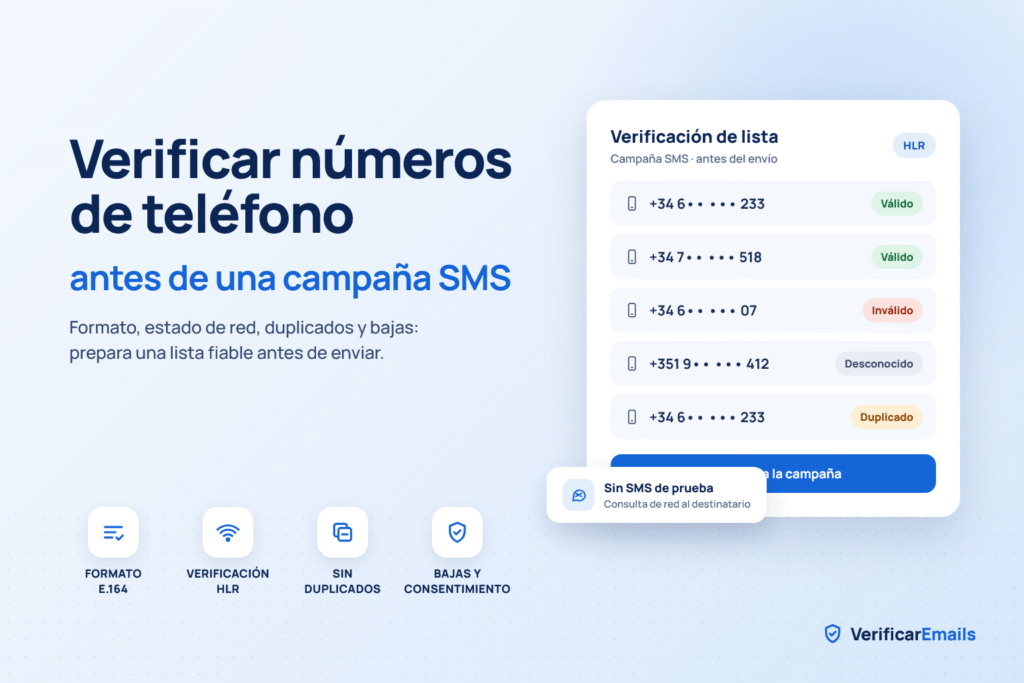
query Checking the structure helps you hunt for rare lengths or prefixes that don’t fit with the numbering plan. What it doesn’t tell you is whether that particular number is assigned or if it can receive messages. To do this, you have to go a step further and verify mobile phone numbers with HLR. HLR verification looks up network information, although what you get will depend on the country, carrier, and service you use. And if the query returns “unknown,” leave it as unknown. Unknown is not the same as invalid.
Type of line: mobile, landline or VoIP
Knowing what type of line each number is helps you choose who you send to. Don’t trust that everything in the “mobile” field of your CRM is really a mobile. Spoiler: many times it isn’t. Also, whether a line can receive SMS or not depends on the service and the destination. Before putting landlines or VoIP in a campaign, take a look at your provider’s conditions.
Country and operator
The international prefix tells you how to interpret the number, but not where the person is right now. And something similar happens with the operator: for portability, the operator to whom a range was originally assigned may not be the one that customer has today. If you need that data, use a check that takes into account operator changes and take a good look at which fields it returns to you.
Number status and verification
date Any verification is a photo of the moment you do it. Tomorrow the result may be different, so always keep the date next to the status. Another thing not to mix: the fact that the line is valid does not tell you who uses it. The technical verification, by itself, does not confirm that the number is still from the person you have registered in the CRM.
Manual checks before validating a list
Checking by hand is good for catching the most obvious errors and preparing a sample. However, with large databases, you can’t cope: you need a process that always applies the same rules.
Format and country
review Start by looking for the typical: incomplete numbers, extensions stuck to the phone, characters that don’t look like anything and records without a country. And please, don’t +34 the whole list if you have contacts from abroad. The libphonenumber documentation explains quite well the difference between validating a number and confirming that a phone is assigned or contactable. To prepare the data, more or less like this:
- Identify the country of each number based on reliable contact information.
- Interpret the national format according to the rules of that country.
- Generate the international version without removing digits like crazy.
- Adjust separators and the + sign to what the target platform requests.
Also save the original value. If something goes wrong in the conversion, you’ll need it to investigate. And if you’re not sure which country a number is from, put it aside and review it calmly.
Using Verification
Tools A formatting tool helps you detect numbers that don’t meet known rules. But before you use it, ask yourself: does it just look at the structure, or does it also give network information? It’s not the same. In our phone number validation service , you can see the available options and keep the level of verification you need. If you prefer to set it up yourself, the libphonenumber library has functions for interpreting and formatting numbers. Just keep in mind its validation limitations before using its result to decide who to send to.
Limitations of manual
review Looking at a number doesn’t tell you if it’s active on the network. And it’s also very easy to treat two records differently that are basically the same, or “correct” a number that was fine. If the list is long, define rules that can be repeated and save the results. The idea is that, if someone asks you why a contact entered, was left out, or is pending, you can explain it.
How to automate phone
verification Automating makes sense when you capture contacts all the time or launch campaigns on a recurring basis. In addition, the date and result of each check are recorded without anyone having to remember.
What a verification
API brings to the table
An API connects your app to the validation service. You can use it just before you save a contact or while you’re preparing for a hearing. Which fields it returns depends on the service you have signed up for. Design the integration by reading the actual documentation, and also think about errors, queries that don’t yield clear results, and usage limits.
Benefits of integrating verification into your process
If you validate at the time of recruitment, you can ask the user to correct the number while they are still filling out the form. Much better than discovering the error three months later. And if you check just before sending, you detect the data that has become old. The HLR query is made without sending a verification SMS to the recipient. Nothing to do with an OTP code, which is used to verify that someone has access to the number at that time.
Which service to choose for your campaign
It depends on what you want to check: the structure, the portability or the network information. Take a good look at the coverage in the countries you send to and how unknown results appear. In VerificarEmails you can make individual queries, upload files or automate everything with the API. Before preparing the list, take a look at the modalities to validate mobile phones using HLR.
Integration with your SMS
platform Organize the integration thinking about how you select the recipients:
- Check format and country before launching network queries.
- Save the service credentials in a secure place.
- Associate each result with their contact and the verification date.
- Decide which results let the contact through and which need review.
- Apply unsubscribe and channel preferences before scheduling the campaign.
In Skeyon, the management of consent by channel and the monitoring of SMS complete the preparation of the audience. Technically verifying a number and choosing authorized contacts are different steps, even if they are one after the other.
Step-by-step guide to verify phones before sending
First of all: work on a copy of the list. Leave the original data intact and write down the changes, in case any incidents need to be reviewed later.
Step 1: Prepare the database
Locate the phone, country, and contact ID fields. And check that the spreadsheet hasn’t eaten the + signs, zeros, or turned the phones into scientific notation (more happens than you think). Then normalize the numbers and look for duplicates on that normalized value. This is the time to clean up a list of real phones, but before merging records look at their preferences and unsubscribes.
Step 2: Choose the level of verification
With syntax validation, you detect structural errors. If you need more information about the campaign motives, add the network query. And decide from the beginning what you’re going to do with the inconclusive results. Improvising it in the end usually goes wrong.
Step 3: Run the verification
You can go with individual queries, files, or an API integration. Whatever best fits your volume and how often you do it. Do a test first with a sample that includes the countries and formats you have. How long it takes depends on the service, coverage, and size of the list, so don’t assume any timeframe.
Step 4: Interpret the results
Separate into three piles: those that come out successfully, those that come out invalid, and those that do not have enough information. Read the codes according to the service’s documentation. An empty field, a query failure, and a number that does not exist are different things, even if they seem that way at first glance.
Step 5: Prepare your campaign
audience Remove invalids and review pending ones. Then apply consent, unsubscribes, and deduplication. Segment by what really matters to the message, such as language or country if you have that data. Separate by operator? Only if there is a specific operational reason.
Step 6: Incorporate the results of the sending
When the campaign ends, write down the delivery statuses and the reasons for failure. With that, the next selection of recipients will be better. How often to review? It depends on how old the list is, how much you are capturing and the incidents you see. If you rescue a database that had been stopped for months, review it before using it. No exceptions.
Common mistakes when verifying phones for SMS
A format check, a network query, and a delivery acknowledgment answer different questions. See the differences between syntactic validation, MNP, and HLR
In the end, whether the process works depends as much on the checks as on what you do with their results.
Import without reviewing the data
An import can end “successfully” even if the phones are wrong. Check country, format, and that each column goes where it needs to go before saving anything. “Imported record” and “recipient ready to receive SMS” are not synonymous.
Apply the same conversion to all countries
Neither always remove the first digit nor put a default prefix on the entire base. Each country has its rules. And don’t confuse the international format of the phone with the format required by a specific API. Each service has its documentation; follow it.
Relying on an old
check indefinitely A good result doesn’t last forever. Save the date of the query and use the age of the data to know when it’s time to review it again. If you retrieve an old list, also look at your communication preferences before resenting.
Deduplicating without respecting unsubscribes
Running out of the most recent record can erase a previous unsubscribe. And that’s a problem. Resolve preference conflicts before setting up the audience. Deduplicating is for not repeating messages, not for bypassing contact restrictions.
Treat all failures as invalid
numbers A permanent failure and a temporary failure require different decisions. In SMS, pull your provider’s statuses and codes instead of copying the bounce categories from the email. Just because of the content or sender doesn’t mean the phone doesn’t exist. And it doesn’t make sense to retry a send over and over again without knowing why it failed.
Conclusion
Verifying phone numbers before an SMS campaign leaves you with a more reliable audience and fewer mailings thrown away. Start by normalizing the data and don’t end until you incorporate the actual delivery results. Mix syntactic validation, network queries when necessary, deduplication and preference management. Whatever is inconclusive, leave it inconclusive. And don’t promise guaranteed delivery, because that doesn’t exist. For your next campaign: review a sample, define what you’re going to exclude and make sure that the opt-outs are still respected. When that works, you expand it to the rest of the contacts. If your next campaign is Black Friday, you have the complete process, emails included, in how to validate data before Black Friday 2026.
Frequently Asked Questions
How to verify phone numbers before sending SMS? Normalize each phone with its country, review the format, and if you need more information, make a network query. Then interpret the results, remove audience duplicates, and apply channel opt-outs and preferences. How long does it take to verify a phone list? It depends on how many records you have, what countries they are, the service, and their processing limits. It’s best to test with a sample before planning the full review. Can I verify a phone without sending it an SMS? Yes. With an HLR verification, you get network information without sending any verification SMS. The coverage and level of detail change depending on the destination. Of course, it doesn’t tell you who the owner is or if they have given their consent. How often should I check my contacts? Depending on how old the data is, how often you run campaigns, and how many glitches you see. Always check old lists before reusing them and save the date of each check. Does a verified number guarantee that the SMS will arrive? No. Delivery also depends on the destination’s network, sender, content, and restrictions. To find out what happened to the shipment, check the delivery status and error codes on your platform.