
















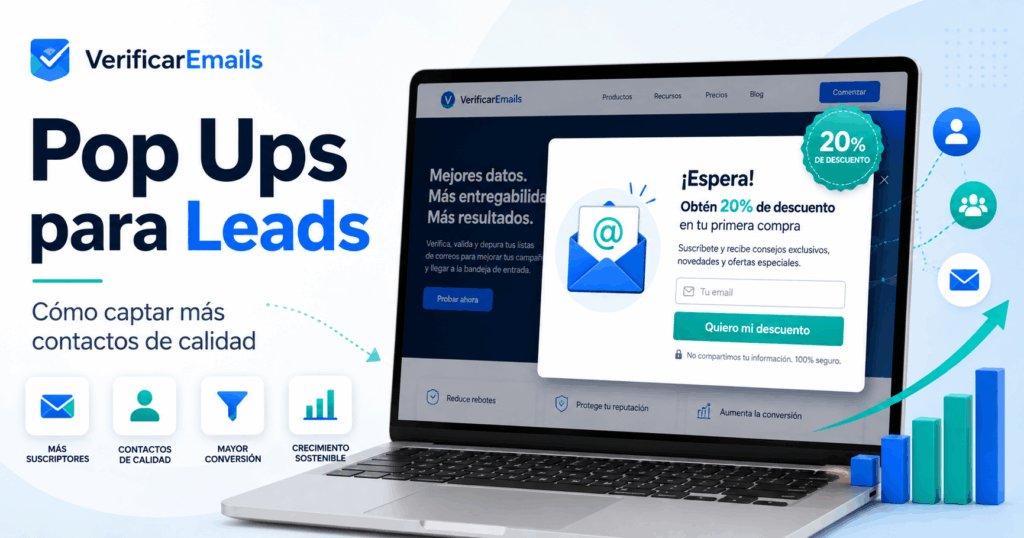
Lead popups remain one of the most effective tools for capturing leads in 2026. Their success, however, depends entirely on how you implement them. Well executed, they convert anonymous visitors into qualified leads without harming the user experience.
- Optimized popups convert up to 57.7%, while the average remains at 4.23%. The difference is in timing, design, and segmentation.
- The moment of appearance determines success: wait at least 15 seconds or activate the popup after 50-70% scrolling to avoid immediate rejection.
- Fewer fields, more conversions: A single-field form converts nearly twice as much as a five-field form.
- Mobile popups convert 97% more than desktop (5.60% vs. 2.86%), but Google penalizes those that block main content.
- Measure quality, not just quantity: a lead that reaches the commercial conversation is worth more than 100 contacts who never respond.
- Gamified formats multiply results: spin-to-win popups reach 29.99% conversion compared to 4% for traditional formats.
The average conversion rate for lead popups ranges from 3.5% to 5%, but the best optimized ones exceed 50%. Remember that 90% of your visitors won’t come back if you don’t give them a reason to stay. Popups are no longer annoying ads but strategic tools that produce a 5% to 10% increase in conversions. The problem is not the format itself, but how it is used.
In this article, you’ll learn which types of popups work best, how to implement them correctly, and what real metrics you should measure to generate more quality leads.
You can create your own optimized popups in https://popup.verificaremails.com/
What are lead popups and why they matter in 2026
“Pop-ups work. The data has been clear about it for a decade, and it’s clearer now than it was in 2016.” — BDOW!, Company analyzing pop-up data
Definition of popup for lead
captureA lead popup is a pop-up that appears while you’re browsing a website with a very specific goal: to collect contact information. These are forms that ask for data such as name or email in exchange for something of value: a discount, exclusive content or access to an offer.
What sets these popups apart from other pop-ups is that their function is not generic advertising. Its purpose is to build a database of qualified contacts. You can find them in different formats: modal windows that cover the center of the screen, sliding banners that appear in a corner, or persistent top bars. Each format responds to a different moment in navigation and to a specific user behavior.
Remember that lead popups work as a gateway to your email marketing and automation ecosystem. If you get it wrong from the start, you automate badly later. It’s not just about displaying a form, but about designing an experience that converts anonymous traffic into contacts with whom you can build a real business relationship.
Evolution of popups from 2020 to 2026
Popups were born in the 90s as intrusive advertising windows that interrupted browsing without any kind of strategy. For years they were synonymous with annoyance because they appeared without context or value for the user. However, since 2020 the perception has changed significantly.
As websites adopted more sophisticated marketing practices, popups evolved into behavior-based engagement tools. They stopped appearing randomly to activate according to specific actions: time on page, scroll rate, exit intent or interaction with certain elements.
Today, in 2026, popups have become strategic assets that integrate with segmentation, automation, and predictive analytics systems. In addition, changes in digital privacy have increased its value considerably. With the demise of third-party cookies, the email address a visitor hands over has become one of the few first-party signals you fully control. A well-executed popup is, right now, the fastest way to collect first-party data in an environment where third-party information has become scarce.
Current Conversion Data: What the Numbers
SayThe data is clear: lead popups are still effective when implemented well. According to analysis of more than 516 million views, the average conversion rate in 2026 is 4.23%. Other studies put this figure at 4.82%, an increase from the previous year.
But the average hides very significant differences. The top-10% best-optimized popups achieve conversion rates of 57.7%, five times above the average. The performance also varies by sector: ecommerce achieves 6.88%, while B2B companies only achieve 2.01%.
The difference between mobile and desktop is just as striking. Popups on mobile devices convert 5.60% vs. 2.86% on desktop, 97% more effective. Mobile users are clearly more willing to interact with forms optimized for small screens.
Equally, the format matters. Spin-to-win popups reach rates of 29.99%, well above the 4% of traditional formats. Popups with images convert at 5.71% vs. 3.98% without them, and those that offer discounts achieve 7.45% vs. 4.60% without incentive.
Types of popups that generate
the most leadsEach type of lead popup responds to a different moment in the user. Choosing the wrong format is just as detrimental as having none at all.
Exit-intent: Capture when the user leaves
The exit-intent popup is triggered when it detects that the user is about to leave the page. The system records the movement of the cursor towards the edges of the browser on desktop, although on mobile this detection is more limited because there is no cursor. It works as a last resort to recover opportunities that would otherwise be lost.
You can offer farewell discounts, abandoned cart reminders, or exclusive content right when the visitor makes a gesture to leave. A popup with a discount code activated by exit intent can generate 37% more purchases.
Scroll popup: appears based on behavior
This format is activated when the user scrolls to a specific point on the page, usually between 50% and 70% of the content. If someone has progressed to that point, they’ve already shown enough attention to receive your offer.
It’s less intrusive than other formats because it appears while the user is actively consuming content, not at the start of the visit. They’re especially effective in long articles or resource pages where you can offer content directly related to what the visitor is reading.
Welcome popup: first impression that converts
Inbound popups appear when the user accesses the website. To avoid being invasive, leave a margin of 2 to 3 seconds before showing it and do not keep it active for more than 15 seconds. They work well for first-time purchase offers, newsletter subscriptions, or special promotions.
Remember that interrupting the user before they see your content can increase the bounce rate. This format demands a clear value proposition from the first second.
Slide-in or sliding
boxThe slide-in comes in from a corner of the screen without blocking the main content. The user continues to read what interests them, which considerably reduces the feeling of intrusion. It fits well for downloadable resources, subscriptions, or related content.
It is usually activated by reading or scrolling time, which allows its appearance to be synchronized with the visitor’s real level of interest.
Persistent
top barThe floating bars occupy a top or bottom strip and remain visible while you browse. They are the least intrusive format because they do not cover the content and close easily. Use them for low-friction messaging: free shipping, simple promotions, or short notices.
Their conversion rate is lower than other formats, but they compensate with constant visibility without harming the mobile experience.
Click-activated
popupThese popups open only when the user clicks on a specific link or button. It’s the most respectful way to display a popup because the visitor explicitly requests its appearance. To configure them, you need to define CSS selectors that identify the HTML element that will trigger the popup.
Engagement rates are higher precisely because there is an explicit intent to interact with the offer.
How to implement popups to maximize conversion
“A good pop up window does not interrupt the journey. It responds to the journey that is already happening.” — Receiver, Marketing Platform
Implementing a lead popup isn’t just a matter of design. Every technical decision you make — when it appears, what it asks for, and how it looks on mobile — directly affects how many contacts you get.
The exact moment to show your popup
Wait at least 15 seconds before showing a popup to new visitors. Behavior-based triggers convert better than those that rely solely on load time.
The rule is simple: in editorial content, activate the popup after 50-70% scrolling or real reading time. On service pages, do this after the user interacts with key elements like pricing or CTAs. If you show it after the second of loading, you will worsen both the closing rate and the bounce. The user still doesn’t know where they are, and any interruption at that point is perceived as a nuisance.
Design that converts: essential
elementsAsk only for the essential information. A single-field form converts almost twice as much as a five-field form . Each field you add is one more reason to close the window.
Apply color contrast to make the most important element stand out without having to lock the entire screen. Use a single action button with a clear verb and color that stands out against the overlay. Remember that you only have a few seconds to impress the visitor, so brevity is essential. And it always makes it easy to close: a visible and large “X”, especially on mobile.
The perfect message: what to offer in exchange for the lead
If you ask for data, you have to give something valuable in return. The headline must express a concrete promise in eight words or less. More text doesn’t convert more, convert less.
It offers something useful and directly related to the page the user is reading. Include social proof, figures, or warranties that justify the exchange. And segment: by traffic source, previous behavior, and funnel stage. Thus, the popup ceases to be an interruption and becomes a contextual proposal that the user perceives as relevant.
Frequency and cookies: when to show
againShow a popup only once per session or once a day at most. Set cookies or appearance limits so as not to overwhelm the user. Don’t repeat multiple popups in the same session: if you do, your site will lose credibility before the visitor reads a single line.
Mobile optimization without SEO
penaltiesSince 2017, Google has penalized intrusive interstitials on mobile that block content. Avoid covering the main content right after the user arrives from the search engine.
We recommend occupying less than 30% of the screen on mobile devices. Also, make sure the close button is visible and avoid heavy overlays that damage Core Web Vitals. A well-adapted mobile popup not only respects the user, it also protects your positioning on Google.
Real metrics: measure if your popup is working
Measuring the performance of your lead popups determines whether you’re capturing leads or missing out on opportunities. Without data, you only have assumptions.
Popup
conversion rateThe conversion rate is the percentage of visitors who complete the desired action in your popup. Calculating it is simple: divide the number of leads captured by the total impressions of the popup and multiply by 100.
This indicator measures the direct effectiveness of your strategy. A low CVR signals misalignment between message and offer, form that is too long, or lack of clarity in the proposal. The important thing is that improving this metric reduces your cost per lead without having to touch the budget. Compare historical conversions between different types of popups to identify which one works best with your audience.
Impact on bounce
rateThe bounce rate reflects how many visitors leave your site without interacting. It is calculated by dividing the visits that end in immediate abandonment by the total number of accesses, multiplied by 100.
A high bounce rate combined with low page time indicates that your popup promises something it doesn’t deliver or that the audience is poorly targeted. Remember that if your popup appears too early, it can trigger the bounce and negatively affect your Google rankings.
Quality of the lead captured
How many of your leads actually make it to a business conversation? This question is worth more than any single CPL figure.
Lead quality is the real probability that that contact will become a customer. A SQL (Sales Qualified Lead) represents a lead ready to be addressed by the sales team according to specific criteria. We recommend measuring the LTR (Lead Through Rate): of all the leads generated, how many actually reach the sales conversation. For example, 100 leads that produce 18 conversations reveal a lot more about your system than any volume metric. A quality lead asks specific questions, answers follow-ups, and shows a recognizable need.
Tools to measure performance
You don’t need a complex system to start measuring. These are the most commonly used tools:
- Google Analytics: Tracks user behavior, pages visited, and conversions.
- Hotjar: Offers heatmaps and session recordings to understand the visual interaction with your popups.
- Contentsquare: Analyzes qualitative behavior and complements quantitative data.
- HubSpot: Automatically calculates metrics using centralized integration.
Mistakes that kill the conversion of your popups
Fixing the most common mistakes in your lead popups can double your conversion rate. Without touching the budget. Without increasing traffic.
Does your popup appear too early or too late?
Triggering a popup before the user has been able to read the content generates automatic rejection. The visitor is still trying to understand where it is and any interruption is perceived as annoyance. But showing it too late also has consequences: you lose potential subscribers who have already decided to leave. Set the timing based on the average time spent on your site or turn it on after a specific percentage of scrolling. This way you adjust the moment without relying on assumptions.
Asking for too much information
Each additional field reduces conversions drastically. Going from one to five fields brings the rate down from 18.2% to 8.1%. Just ask for the email and complete the profile afterwards using progressive profiling. Asking for data that you already have in the CRM duplicates information and transmits to the user that you do not remember them. Fewer questions, more answers.
Intrusive design that frustrates the user
95% of users report negative experiences with poorly implemented popups. Small or hard-to-find closing buttons frustrate the visitor and trigger the bounce. Displaying multiple popups in a row makes your site look unprofessional and bombards anyone trying to simply read your content. It always facilitates a clear and visible output, especially on mobile.
Do not segment according to the type of visitor
Showing the same thing to everyone is a missed opportunity. A user who comes from a paid ad doesn’t have the same context as one who comes from a blog post. Personalize your message based on geographic location, traffic source, or previous behavior so that your offer resonates with the recipient.
Forgetting the mobile
experienceGoogle penalizes intrusive interstitials that cover main content on mobile. It occupies a maximum of 30% of the screen and ensures that the close button measures at least 44×44px. A popup that works well on desktop can destroy your positioning if it’s not adapted for small screens.
Conclusion
Lead popups are no longer annoying interruptions but strategic acquisition tools that can actually achieve conversion rates of over 50% when optimized correctly. The secret is not in the format, but in how you implement it: precise timing, non-intrusive design, relevant offer and adequate segmentation.
Constantly measure your conversion rate, bounce impact and quality of leads captured. Avoid basic mistakes like showing up too early, asking for too much information, or neglecting the mobile experience. A well-executed popup transforms anonymous traffic into qualified contacts that feed your business ecosystem.
You can create your own optimized popups in https://popup.verificaremails.com/
FAQs
Q1. What conversion rate can I expect from a well-optimized lead popup? The average conversion rate for lead popups in 2026 ranges from 4% to 5%. However, the best-optimized popups in the top 10% can achieve conversion rates of 57.7%, much higher than average. Gamified formats such as spin-to-win achieve rates close to 30%, while discounted popups convert around 7.45%. The difference between an average popup and an optimized one can multiply your results by five.
Q2. What is the best time to display a popup without disturbing the user? You should wait at least 15 seconds before showing a popup to new visitors. Behavior-based triggers work better than fixed-time triggers: it triggers the popup after 50-70% scrolling through editorial content or after the user interacts with key elements such as prices or CTAs. Showing the popup within a second of loading increases both the closing rate and the bounce, significantly reducing your conversion.
Q3. How many fields should my popup form have to maximize conversions? Ask only for the essential information. A single-field form converts almost twice as much as a five-field form. Each additional field drastically reduces conversions: going from one to five fields drops the rate from 18.2% to 8.1%. Ideally, you should ask only for the email initially and complete the user’s profile later using progressive profiling techniques.
Q4. Do popups negatively affect my SEO rankings on Google? Since 2017, Google has penalized intrusive interstitials on mobile that block main content immediately after the user arrives from the search engine. To avoid penalties, your popup must occupy less than 30% of the screen on mobile, have a visible close button and not block the content immediately. Well-implemented popups that respect these guidelines do not negatively affect your SEO.
Q5. Which type of popup generates the most leads: exit-intent, scroll or welcome? Each type works best depending on the context. Exit-intent popups are effective in recovering users who abandon, and can generate up to 37% more purchases with discounts. Scroll popups (triggered at 50-70% of the content) are less intrusive and reward demonstrated interest. Welcome popups work for first-purchase offers, but they can increase bounce if they appear too early. Click-activated formats have the highest engagement rates because the user explicitly requests their appearance.